
Subscribe
how to remove accounts?
Posted on 07 December 2019 - 01:24 PM
how to remove accounts? in the top right cornerPosted on 07 December 2019 - 06:32 PM
Hello!Are you asking about deleting a Badlion account? If so, follow next guide:
Settings >> Scroll a bit down, you should see "Danger zone", type your Badlion account's name in the box, and it should work.
If it's not it, please let me know. :)
Posted on 07 December 2019 - 09:54 PM
I'm pretty sure Xequ4lsZ was asking about the in-game account switcher.It's not possible to remove accounts from the account switcher in Badlion Client at the moment. You can do that through the Minecraft launcher:
1. Open Minecraft launcher.
2. Click on the area which shows your Minecraft name and the word "Connected".
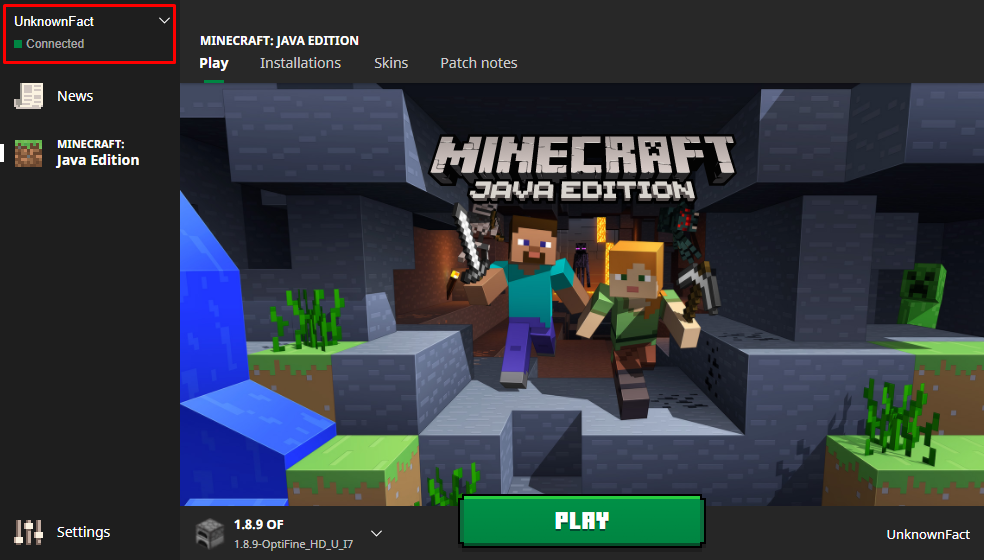
3. Under "Choose Account" you will see all your Minecraft accounts. Click on the account you want to remove.
4. Click on the area which shows your Minecraft name and the word "Connected" again.
5. Click on "Log Out".