
Last edited on 26 January 2020 - 07:35 PM by Zoneds
I load up mine craft with BL client it shows my character as the right skin in the top right, but then when I launch the game my skin is all wrong in the cosmetics it's incorrect. In-game it's incorrect, also can't see my OF cape; I know for sure I bought it and it was on my account previously before it started to happen. Other people say they can see my cape and skin, but I can't see it.Posted on 26 January 2020 - 10:10 PM
Hello,Which Minecraft version did you launch with Optifine enabled? Do you have Optifine settings available?
Posted on 26 January 2020 - 11:12 PM
1.8.9 also i'm pretty sure? why would I not have them available? I just want this fixed ;-;Posted on 26 January 2020 - 11:50 PM
If you have enabled Optifine, make sure to enable capes in video settings (Options -> Video Settings -> Details -> Show Capes) and in the skin customization settings (Options -> Skin Customization -> Cape).What exactly is wrong with the Minecraft skin? Does it show a completely different skin in some parts of the client? Also, provide screenshots of this so it can be easier to understand the issue.
Posted on 29 January 2020 - 09:47 PM
Hi I was wondering if Opitifine Cape works with Badlion client running at the same timePosted on 29 January 2020 - 09:55 PM
Hi I was wondering if Opitifine Cape works with Badlion client running at the same timePosted on 29 January 2020 - 10:04 PM
yRqncor wrote
Hello,
Yes, Optifine capes work with Badlion Client. All you need to do is enable Optifine before launching the game.
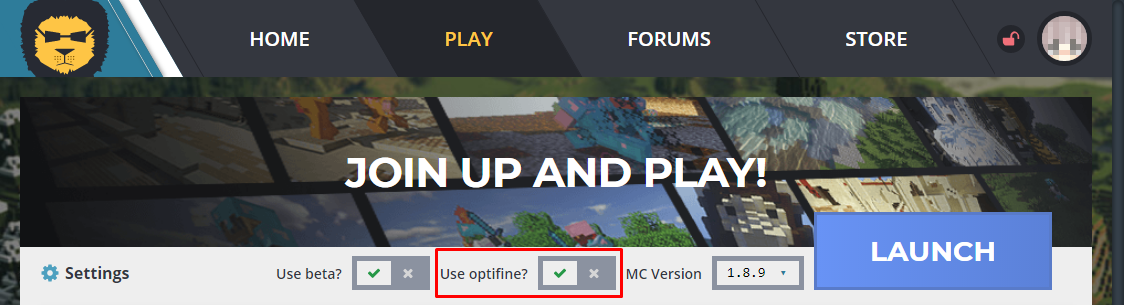
As long as there is Optifine available for the specific version, you should see your Optifine cape. If you want to use 1.15.x, you won't see your Optifine cape on that version because there is no Optifine available for 1.15.x.
Best regards,
UnknownFact