Badlion assumes no responsibility for any errors which might occur while doing things which are not listed in this tutorial or messing something up. The information contained in this site is accurate and, if carefully followed, should solve the problem
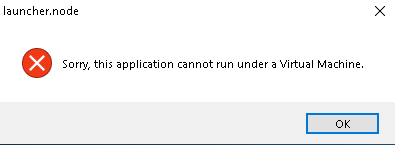
The Badlion Client cannot run on Cloud Computers or Virtual Machines. However, you may not be using a virtual machine, yet you are getting this pop up. That means there is some sort of virtualization going on your computer.
How to resolve this?This error message can come from some installed 3rd party softwares or built in features on your computer. You have to go through these solutions one at a time until it fixes your issue as you probably won't need all of them to make the Badlion Client work.
Solution #1Press Windows + R

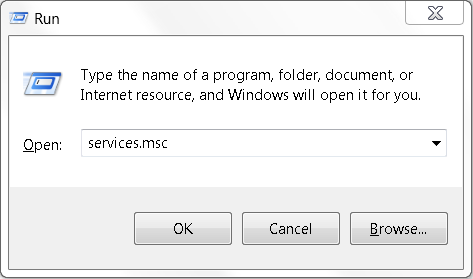
Type "services.msc" and hit enter
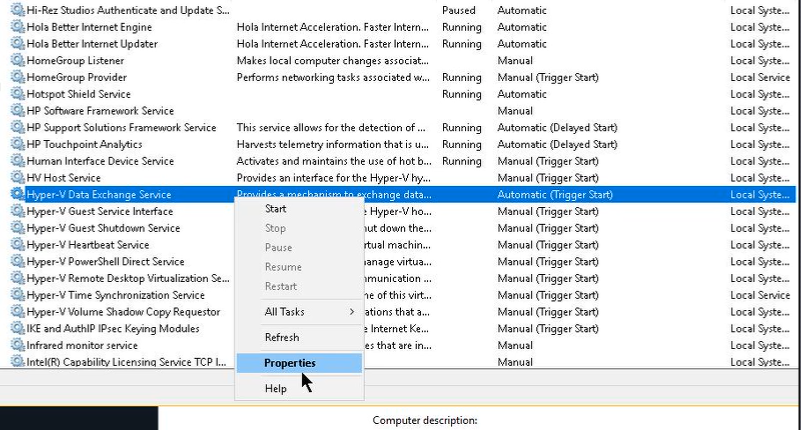
Right click on one of the Hyper-V XXX Services and click on "Properties"
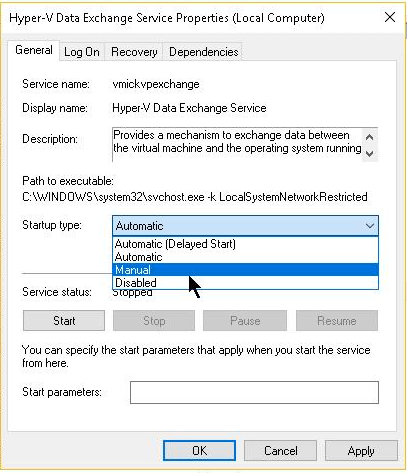
Change the startup type to "Manual", click on "Apply", then click on "Ok"
Repeat all of these steps until all of the Hyper-V services startup type are set to manual and
don't forget to restart your computer!
Solution #2Open the Start menuSearch for "Turn Windows features on or off" and click on the top resultUncheck the "Windows Sandbox" optionClick on the "Ok" button and then "Restart now"Solution #3Firstly, you are going to need to figure out if you have an Intel or AMD CPU. When that is done, you will have to go into your BIOS and disable the virtualization settings. We advise you to follow your motherboard's guide to disable these as all motherboards use different BIOS configurations. The virtualization settings can have different names for different CPU brands, so here are some of the most common names:
Intel:
- Vanderpool
- VT-X
- Intel-Virtualization
AMD:
- SVM
- Secure Virtual Machine
- AMD-V
You will most likely have to restart your computer in order to fully disable these settings.
Solution #4Go to "Settings"Click on "Windows Security"Click on "Device Security"Click on "Core isolation details"Disable "Memory Integrity"Restart your computer to apply the changes
