
Posted on 01 February 2020 - 08:06 PM
I check my Badlion Mod Profile folder and it shows the profile I downloaded there (with my default ones) however, when I open up my game it isn't there. This used to work before I reset my pc but for some reason I can't get it to work now.Posted on 01 February 2020 - 08:14 PM
Hello,Follow this guide to convert mod profiles - https://www.badlion.net/wiki/how-to-convert-mod-profiles
Posted on 01 February 2020 - 08:18 PM
Thank you for trying to help me, unfortunately this did not work. :(Is there any other solution?
Posted on 01 February 2020 - 08:20 PM
If you followed the guide, it should have fixed the mod profile issue.Send me the download link of the mod profile and I will convert it for you. Also, don't forget to mention which version the mod profile is for.
Last edited on 01 February 2020 - 08:29 PM by Marpin
https://www.mediafire.com/file/tynxnny0yseoyvg/Default.json/filePosted on 01 February 2020 - 08:22 PM
its for 1.8.9Posted on 01 February 2020 - 08:26 PM
You just sent me the download link of a texture pack, not a mod profile.Posted on 01 February 2020 - 08:27 PM
whoops -https://www.mediafire.com/file/tynxnny0yseoyvg/Default.json/file
Posted on 01 February 2020 - 08:44 PM
Here is your mod profile - https://www.mediafire.com/file/0zngbmlng0geojy/Default.json/fileDownload it and move it into the BLClient-Mod-Profiles folder. Then launch the game and select it.
Here is how I convert all 1.8.9 mod profiles:
UnknownFact wrote
2. Launch the game. Click on "Mod Profiles" in the main menu.
3. Click on the "i" icon and the icon with a picture of a folder.
4. Then restart the game.
5. It should move a mod profile from BLClient-Mod-Profiles-1.8 to BLClient-Mod-Profiles. If it does move it, it means your profile was converted successfully.
Posted on 01 February 2020 - 09:29 PM
The download worked, thank you.Final question is where is the 1.8 folder?
Last edited on 01 February 2020 - 09:46 PM by UnknownFact
It can be found in the .minecraft folder.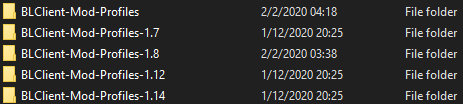
If you don't have those folders and you want to convert a specific mod profile which has been made for a specific version(-s) before the new mod profile update, create a new folder for the specific version (names can be seen in the screenshot above) and follow this guide (that's what I did to convert profiles).
Posted on 01 February 2020 - 09:48 PM
Thank you very much, did this and it worked.RESOLVED
Posted on 01 February 2020 - 09:49 PM
You're welcome! :)Feel free to contact me or create a new thread if you have any questions about Badlion Client!
Best regards,
UnknownFact