
Subscribe
Mods background visibility (1.8.9)
Last edited on 13 February 2020 - 11:00 PM by slimmie
Just reinstalled BLC and I figured out that HUD Mods BG doesn't completely disappear.Is it always worked like that? Is there a way to fix it? It looks a little bad for me.
Look carefully!

Posted on 13 February 2020 - 10:51 PM
BG is off for sure
Last edited on 14 February 2020 - 02:46 AM by UnknownFact
Hello,There is a temporary fix for this issue:
1. Close Badlion Client.
2. Open the .minecraft folder.
3. Open the BLClient-Mod-Profiles folder.
4. Find the mod profile you are currently using. Right-click on it and open it with notepad.
5. Press ctrl+f to use the search tool. Type armorStatus or showPing and press ENTER.
6. You will see something like this for each mod:
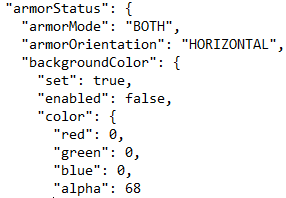
Find "backgroundColor" for each mod and under it change the alpha value to 0 to get full transparency.
For showPing the right alpha value is under "graphicModeSettings":
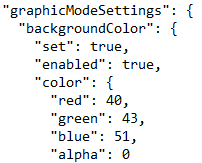
7. Save the changes.
8. Launch Badlion Client.
Posted on 14 February 2020 - 09:07 AM
Thx, it works!