
Posted on 17 February 2020 - 12:35 PM
Hi everybody,I bought the insider but i Don't know how to activate him ?
Can someone help me please ?
Thank's !!
Posted on 17 February 2020 - 12:39 PM
Hello Jonkox! You can enable Insider additions by opening up your mods slideout and clicking insider at the top. That area is dedicated to things all insders can use. Also remember to restart your client so that your insider is loaded in, otherwise it may not show up at all :)Posted on 18 February 2020 - 05:37 AM
ok thank you,and do you know how to change the colour of my message at the top of my pseudo ?
Posted on 18 February 2020 - 05:48 AM
and i can't see my diamond in front of my name, while the others guys can see it.Last edited on 18 February 2020 - 08:19 AM by UnknownFact
Hello,You need to use Minecraft color codes in order to change the color of the Insider nametag message. For example, if you want it to be red, write &4 at the beginning of the message.
Here are all Minecraft color codes:

If you want to see the diamond icon, go to Badlion Client graphics settings and enable "Nametag in F5". If you don't know how to open graphics settings, press ESC, click on "Badlion Client Settings", then click on GRAPHICS (it is located at the top.
Posted on 18 February 2020 - 09:09 AM
and do you know how to make the diamond change colors by itself? So that it's not the same color all the time?Thank's !
Posted on 18 February 2020 - 09:55 AM
Hello,Open Insider settings tab. Find "Nametag Icon Color" and click on the colored box next to it. Then select "Rainbow" or "Chrome".
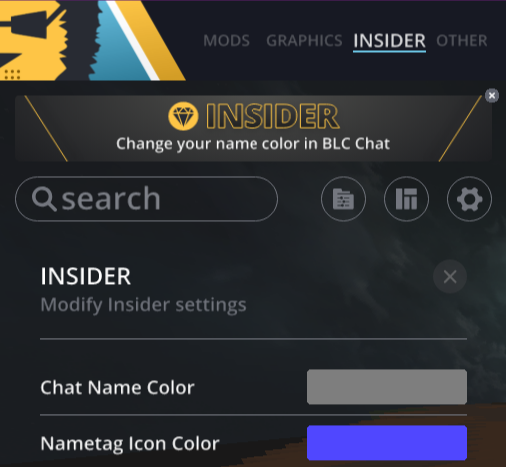
If it doesn't work after seleting one of those options, restart the game.
Posted on 18 February 2020 - 11:18 AM
okay thank you, and the last question XD :is it possible to change the colour of our name with the insider ? not the message but the name.
Last edited on 18 February 2020 - 11:48 AM by UnknownFact
Hello,You can change the color of your name but it will only change the color in the Badlion Client new chat (the one where are multiple language chat channels).
Open Insider settings tab, find "Chat Name Color" and click on the color box.