
Subscribe
Day/Night cycles breaking
Posted on 18 February 2020 - 01:18 PM
What broke: Day/Night cycles freezingSteps to recreate: Not sure however here is a video of it happening.
Any unusual configuration stuff:
Additional Details: I don't have time changer enabled and this only happens on BLC and not vanilla.
I also have the gamerule doDayCycle set to true
Posted on 19 February 2020 - 12:22 AM
Hello,It works perfectly fine for me on 1.15.x
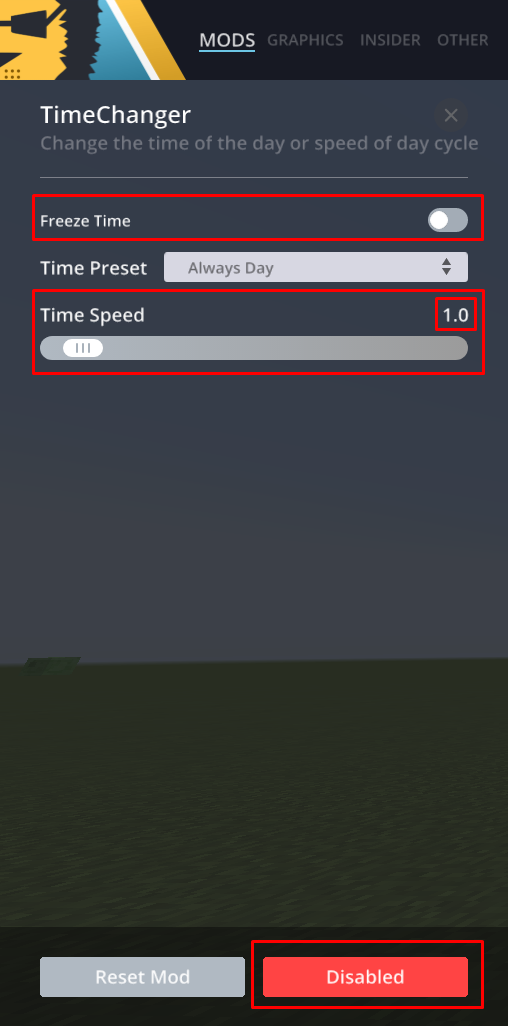
Make sure to double-check if the Time Changer mod hasn't been enabled or any of its settings - "Freeze Time" must be turned off, "Time Speed" must be set to 1.0 or the mod itself must be turned off.
Posted on 19 February 2020 - 06:22 AM
UnknownFact wrote
Hello,
It works perfectly fine for me on 1.15.x
Make sure to double-check if the Time Changer mod hasn't been enabled or any of its settings - "Freeze Time" must be turned off, "Time Speed" must be set to 1.0 or the mod itself must be turned off.
It works perfectly fine for me on 1.15.x
Make sure to double-check if the Time Changer mod hasn't been enabled or any of its settings - "Freeze Time" must be turned off, "Time Speed" must be set to 1.0 or the mod itself must be turned off.
Yeah time changer is turned as well as all of those settings and it still isn't working.
Last edited on 19 February 2020 - 06:48 AM by UnknownFact
Hello,I did a little bit of testing and I came to conclusion: if you are using the non-beta version (I can see in the video that you are using it), and if you have set the time speed to 0.0, it doesn't matter if the mod is disabled. For some reason, it affects the time speed even if the mod is disabled. If you want the time speed to be normal again, set it to 1.0.
^ That's the only thing that would cause the time to stop.
If it's still frozen, follow this guide to submit a proper bug report - https://www.badlion.net/wiki/how-to-submit-bug-reports
By the way, this issue does not happen in the beta version.
Posted on 19 February 2020 - 09:33 AM
UnknownFact wrote
Hello,
I did a little bit of testing and I came to conclusion: if you are using the non-beta version (I can see in the video that you are using it), and if you have set the time speed to 0.0, it doesn't matter if the mod is disabled. For some reason, it affects the time speed even if the mod is disabled. If you want the time speed to be normal again, set it to 1.0.
^ That's the only thing that would cause the time to stop.
If it's still frozen, follow this guide to submit a proper bug report - https://www.badlion.net/wiki/how-to-submit-bug-reports
By the way, this issue does not happen in the beta version.
I did a little bit of testing and I came to conclusion: if you are using the non-beta version (I can see in the video that you are using it), and if you have set the time speed to 0.0, it doesn't matter if the mod is disabled. For some reason, it affects the time speed even if the mod is disabled. If you want the time speed to be normal again, set it to 1.0.
^ That's the only thing that would cause the time to stop.
If it's still frozen, follow this guide to submit a proper bug report - https://www.badlion.net/wiki/how-to-submit-bug-reports
By the way, this issue does not happen in the beta version.
Ok thanks, I changed it to 1.0 and it's working now.
Posted on 19 February 2020 - 04:30 PM
You're welcome!Feel free to contact me or create a new thread if you have any questions about Badlion Client!
Best regards,
UnknownFact
Thread is locked