
Subscribe
Can't set the alpha level for colors to zero
Posted on 26 February 2020 - 10:03 PM
When you go to customize your colors on Badlion client, you can't change the alpha level of colors to be below 11.Posted on 27 February 2020 - 01:51 PM
+1Yeah, in previous updates, essentially all of the backgrounds can be removed but that seems to be not the case anymore.
Posted on 27 February 2020 - 06:18 PM
Hello,Both issues already have been reported to developers.
Here's what you can do to make the background transparent while the issue gets fixed:
1. Close the game
2. Go to .minecraft and open BLClient-Mod-Profiles.
3. Right-click on the mod profile that you are currently using and select 'Open with' and then select 'Notepad'.
4. Press ctrl+f to use the search tool. Then type the name of the mod you want to remove the background from, for example, FPS.
5. You will see lots of things for each of those mods. You will need to look for "graphicModeSettings" under each mod.
6. Then look for "backgroundColor" and under it should be "enabled". Change true to false. Note: if you want to change the alpha level, it also can be found there.
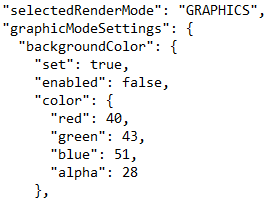
7. Save the file and launch the game.
Posted on 28 February 2020 - 02:22 AM
Hi.I have made a ticket to get this missing checkbox re-added to the Fancy mode mods that are missing it.