Subscribe
How do i add custom skies to a texture pack?
Posted on 04 March 2020 - 12:53 AM
I've searched for hours and all they say is to do something with a "mcpatcher" or "optifine" folder in your resource pack. I have no such folder even with optifine installed. How can i do this?Posted on 04 March 2020 - 06:38 AM
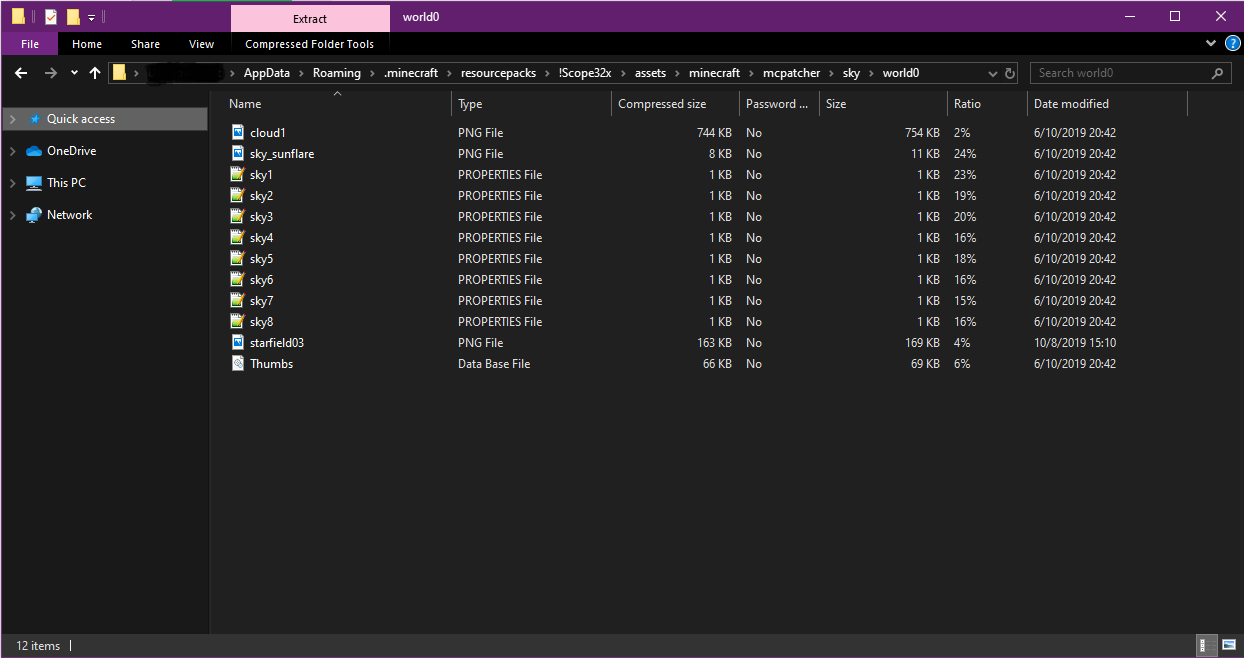
Hello,~\.minecraft\resourcepacks\PackName\assets\minecraft\mcpatcher\sky\world0
For the most texture packs the location is the same.
Posted on 04 March 2020 - 03:31 PM
The problem is is that folder is not showing. Do I have to get mcpatcher? The video i watched said that instead of an mcpatcher folder, there would be an optifine folder, but this folder does not exist.Posted on 04 March 2020 - 08:26 PM
If you don't have the mcpatcher folder, then create it (the correct path has been given in my previous post). Then paste all PNG (.png) and properties files (.properties) into the world0 folder.I don't know which video you were watching but you won't find any folder called 'Optifine' in the texture pack.
Posted on 04 March 2020 - 10:14 PM
I downloaded McPatcher 5.0.3 and it cant find the versions, nor did it add an mcpatcher folder to anything. How could i create the folder or get the program to work?Posted on 04 March 2020 - 10:34 PM
MajesticCreation wrote
How could i create the folder or get the program to work?
My previous posts explain how to do it. I haven't mentioned anything about any programs. You don't need a program to make a folder.
I'm going to explain it again but this time with more detailed information:
1. Open your resource pack.
2. Open the Assets folder.
3. Open the minecraft folder.
4. Create a new folder called mcpatcher.
5. Open the mcpatcher folder.
6. Create a new folder called sky.
7. Open the sky folder.
8. Create a new folder called world0.
9. Open the world0 folder.
10. Move your custom sky files (.png and .properties files) into the world0 folder. If you don't have those, then take them from other texture packs or make your own.
The path (as I mentioned in my first post) should be the same for most of the packs: ~\.minecraft\resourcepacks\PackName\assets\minecraft\mcpatcher\sky\world0
The path and the files should look like this: