
Posted on 10 March 2020 - 04:17 PM
Every time I try to choose a waypoint color, I move my mouse to the waypoint settings bar and it changes the color to one of the colors in the corners, white or black. Is their a button I have to hit to deselect the color changer?Posted on 10 March 2020 - 10:13 PM
Hello,LavaRabbit wrote
Are those the only colors that work? Does it change the color automatically without you clicking on anything? If you can, please upload screenshots of what you are trying to do.
LavaRabbit wrote
Could you elaborate, please? If you want to change the color back to the default color, then there is no separate button for that. You just need to change the color to white (#FFFFFF) or black (#000000).
Posted on 13 March 2020 - 09:19 PM
https://imgur.com/a/e0CUjHg heres a link to imagesPosted on 14 March 2020 - 03:28 AM
Hello,Thanks for uploading screenshots.
Change the alpha level from 20% to 100%.
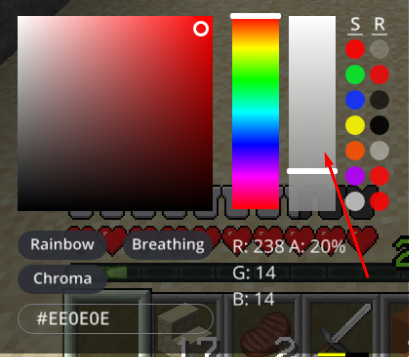
Move the slider to the top.
Posted on 14 March 2020 - 04:32 PM
I think you misunderstood my issue, as what my issue is is that when i move the cursor to the column on the side the place where i selected the color changes, and instead of it being the color i clicked on, it goes to a color on the left side where i moved my mouse from. I would post a video but i cant take one.Posted on 14 March 2020 - 05:07 PM
Oh, I apologize for misunderstanding the issue.Have you tried selecting the color and then pressing ESC without moving your mouse back to the mod's settings?
Also, I need to know which Minecraft version were you using.
Last edited on 19 March 2020 - 09:47 PM by LavaRabbit
Pressing escape works! I did it a couple times but I was just wondering if i was doing something wrong, also sorry for the late response I always forget to check forums on hereEdit: there is a small issue that if i reopen the waypoint menu the color sets back again, also i play on 15.2