
Posted on 01 April 2020 - 12:15 PM
After the installation is complete, the client cannot open it . My shortcut don`t open .I uninstalled it more than ten times and nothing
I have suffered this thing in the past but I do not know how I solved it.
This is the error " The item "Badlion client.exe" that this shortcut refers to has been changed or moved , so this shortcut will no longer work properly. " I also looked in the folder where the client was installed and there is no other shortcut . Please help me
Last edited on 01 April 2020 - 12:26 PM by UnknownFact
Hello,Crucifiex wrote
It automatically won't create a shortcut in that folder.
Go to C:\Program Files\Badlion Client, find Badlion Client, right-click on it and then click on "Create shortcut". Then it should ask you if you want to move the shortcut to your desktop. If it does ask you that, click on "Yes".
Posted on 02 April 2020 - 08:05 AM
Yes but when i open it say " The item "Badlion client.exe" that this shortcut refers to has been changed or moved , so this shortcut will no longer work properly. " I also looked in the folder where the client was installed and there is no other shortcut "Last edited on 02 April 2020 - 08:08 AM by Crucifiex
Maybe you don`t understand what is that error. Lol . How can I make a shortcut if the original shortcut from Badlion folder disapear?Posted on 02 April 2020 - 08:11 AM
Crucifiex wrote
Maybe something is not done correctly on your side.
One user had the same issue as you - https://www.badlion.net/forum/thread/246226
They followed my instructions and the issue was fixed.
Right-click on the desktop icon, then click on Properties. Then open the shortcut tab.
Make sure the target is set to: "C:\Program Files\Badlion Client\Badlion Client.exe"
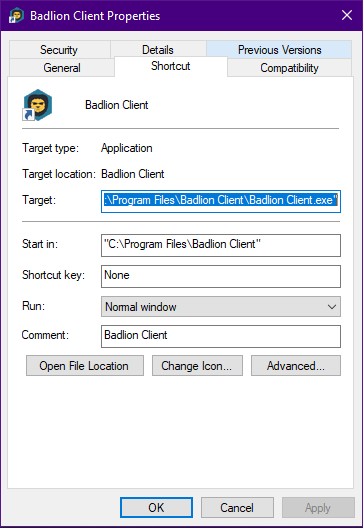
Posted on 02 April 2020 - 08:34 AM
https://imgur.com/QjsrWaV This is my shortcut after you`r update. I can`t even open it. When i try to open the shortcut disapear. Why?Posted on 02 April 2020 - 09:20 AM
Crucifiex wrote
I see no shortcut in that screenshot. I only see the Badlion Client application (.exe) and other files. Is Badlion Client.exe not opening??
Also, close the Badlion Client installer.
Here are three ways to create a shortcut:
3. Point to New, and then click Shortcut (click here to view screenshot).
4. Click Browse to navigate to the file (click here to view screenshot).
5. Locate the program or file to which you want to create a shortcut (This PC -> C: -> Program Files -> Badlion Client -> Badlion Client), click the program or file, click OK, and then click Next (click here to view screenshot).
6. Type a name for the shortcut and then click on the Finish button (click here to view screenshot).
3. Drag it to your DESKTOP.
Posted on 02 April 2020 - 09:23 AM
i know how to make a shortcut . After a complet install. my badlion client.exe from C-Program files/badlion client is gone. I don`t know how to open it. I can`t even make a shortcutPosted on 02 April 2020 - 09:24 AM
in my control panel i have Badlion client 2.13.0 but when i downloand it i have 2.12.0 . Probably the problem is hereLast edited on 02 April 2020 - 09:38 AM by UnknownFact
Crucifiex wrote
Crucifiex wrote
Shortcut and application (.exe) are not the same thing.
Badlion Client application (.exe) should not disappear from the Badlion Client directory on its own.
Uninstall Badlion Client through the control panel. Then go to https://client.badlion.net/ and download it. After installing it, it will ask you if you want to run the application, tick that box and click on Finish and see if it opens.
Posted on 02 April 2020 - 10:32 AM
Still error. https://imgur.com/a/wXK8z9k . And after that my Application.exe ar remove automatically. I don`t have an antivirusPosted on 02 April 2020 - 10:42 AM
The error is from your client. I have another 4 clients in the PC and I have no error with them. If I haven't played for a long time on this platform, it doesn't pack me so hard to solve it. If no one helps me with the error I leave it like this and continue my activity on other clientsPosted on 02 April 2020 - 10:43 AM
Are you also having a problem with launching minecraft does it crash after you hit launch? I uninstalled plenty of times and it just doesn't work.Posted on 02 April 2020 - 11:16 AM
nopPosted on 02 April 2020 - 12:19 PM
EDIT:FIXED