
Posted on 05 May 2020 - 06:36 PM
I used the replay mod trying to record a cheating player in a survival world I play in with a medium-sized community, but when I went back to the replay viewer and watched the recording, the player wasn't there. I am assuming the player didn't show up on screen because they weren't using badlion client while in-game. Is there a way to include all players in replays or some way for me to capture any players in replays? Also, actions the player was doing were showing up (ex. opening chests, killing animals, building) but the actual player wasn't visible.Thanks and any help is appreciated
Posted on 06 May 2020 - 01:11 AM
Hello,ReplayMod should record every player, they don't need to use Badlion Client to be recorded.
• Have you tried opening the player overview menu (press B)? That player might be hidden.
• Was that person, who you tried to record, within your render distance?
Posted on 06 May 2020 - 12:29 PM
They aren't showing up on the player overview menu, but I don't know why. They were in render distance as I was within 5 or 6 blocks of them.Posted on 06 May 2020 - 01:48 PM
Could you please load your replay file again and then go to the launcher and click on "Submit Bug Report" at the bottom? It will send us your logs and the tech support team will look into the issue. Also, please post a download link of your replay file in that bug report.Last edited on 06 May 2020 - 02:48 PM by RobbieMcfly
How do I create a download link for the replay? Also, when I clicked the "Submit Bug Report" button it sent without giving me an option to attach any links.Last edited on 06 May 2020 - 03:00 PM by UnknownFact
Pick a file uploading site (like Mediafire) and upload your replay file, then paste the link in that bug report. If you don't know where to find your replay file, it is located in the Minecraft directory (.minecraft\replay_recordings).Posted on 07 May 2020 - 02:35 PM
I have the link to the replay, I just don't know how to paste it into the bug report. Whenever I click the "Submit Bug Report" button, it does it automatically without any prompt to input any links or such.Posted on 07 May 2020 - 02:48 PM
RobbieMcfly wrote
When you click on "Submit Bug Report", it should bring you to a new bug report thread.
It should look like this:
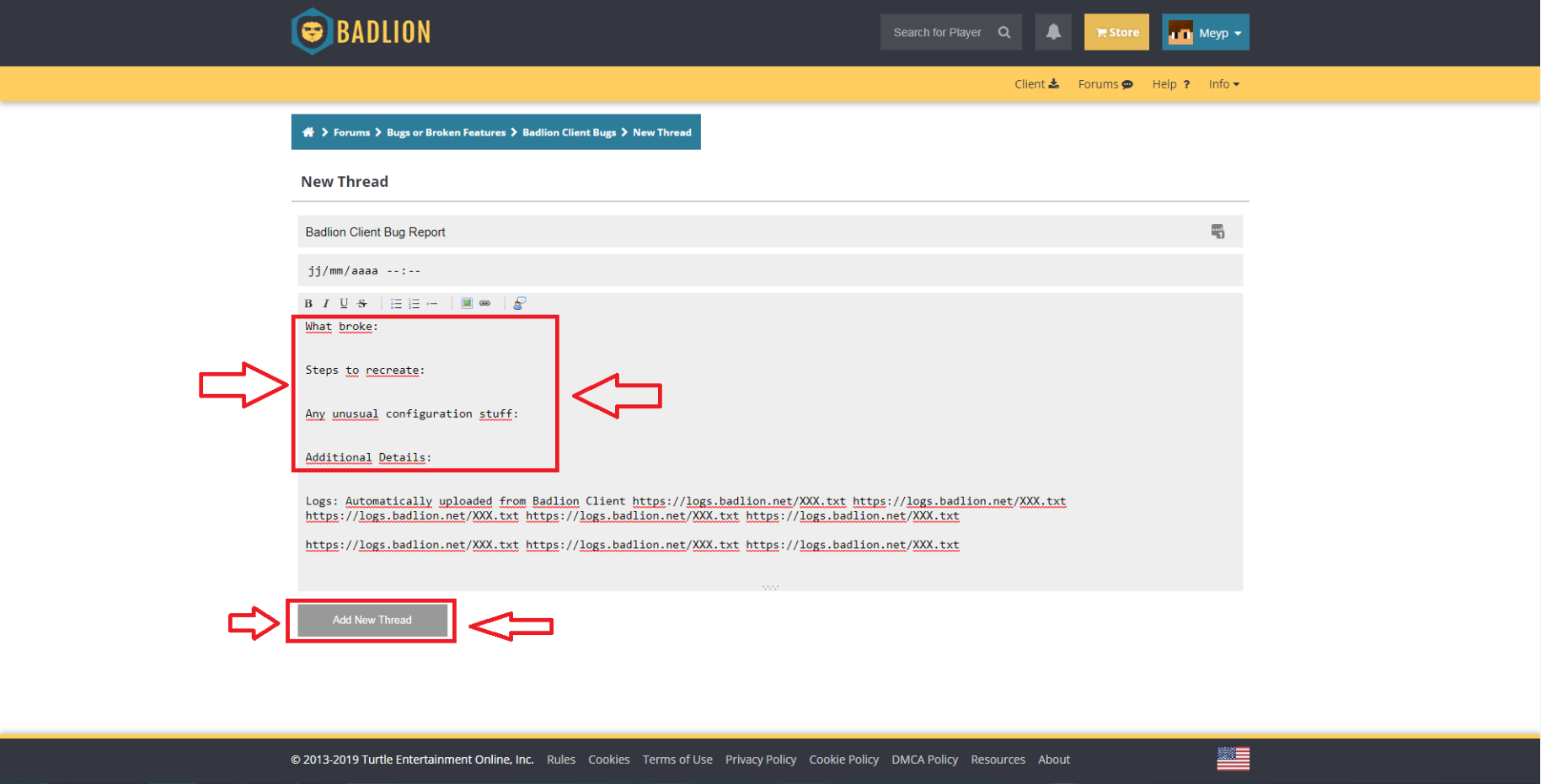
Copy your replay file link from the file uploader site that you used to upload your replay file and paste it (press ctrl+v) like a normal message after the "Additional details" part. You don't need any special options in the thread to paste a link.
Posted on 07 May 2020 - 04:51 PM
I'm doing it now, sorry for the confusion. I got stuck when you previously said to click the "Submit Bug Report" button in the client, so I was doing it in the client and not on the website.Thank you for the help!