
Posted on 12 May 2020 - 12:01 PM
idk what is it PLZ HELPhttps://cdn.discordapp.com/attachments/691335501797654548/707299593381216287/2020-05-05_20.31.43.png

Posted on 12 May 2020 - 12:23 PM
Hello,What am I supposed to look at in that screenshot?
It's better to explain the issue in the forums post instead of just posting a screenshot.
Posted on 13 May 2020 - 03:30 AM
You do not see?Look at fps etc. It is very colorful. Others don't have this, please help me fix it.
Last edited on 13 May 2020 - 05:08 AM by UnknownFact
More details would be appreciated.- Which Minecraft version did you use.
- Was Optifine enabled or not.
Posted on 14 May 2020 - 11:54 AM
i was using mc 1.8.9 and optifine was enabledlook at fps etc there are so colorful
https://cdn.discordapp.com/attachments/691335501797654548/707299593381216287/2020-05-05_20.31.43.png
Posted on 14 May 2020 - 12:27 PM
• Create a new mod profile and enable your mods/settings one by one.• Do not set background as chroma for HUD mods.
Posted on 15 May 2020 - 08:53 AM
the first did not work the second the samesadness, i lov blc dude i lov playing on blc ;[
Posted on 15 May 2020 - 09:20 AM
I have no issues with it, and I couldn't reproduce it.Try turning off VBOs and Fast Render in Minecraft video settings.
At this point, I think it's better for you to send me your Minecraft settings file (\.minecraft\options.txt), Optifine settings file (\.minecraft\optionsof.txt), and the mod profile that you can find in ~\.minecraft\BLClient-Mod-Profiles.
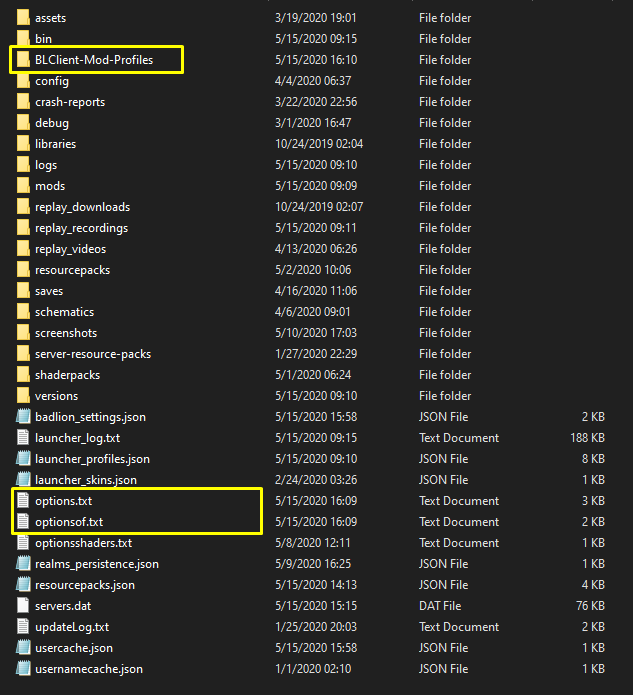
[!] If you don't know how to upload files, go to https://workupload.com/, select all three files from your Minecraft directory, and send me the link. Then I will be able to look into the issue.