
Subscribe
How to edit texture pack description (Please Help)
Posted on 17 May 2020 - 11:01 PM
So I was wondering how you change the description of your texture pack here is what i meanhttps://gyazo.com/17ea3d2811e4af86cf0b1a42b5b25b4e
Last edited on 18 May 2020 - 01:19 AM by UnknownFact
Hello,Open your resource pack, right-click on pack.mcmeta, then open it with a notepad. Then you should see something like this:
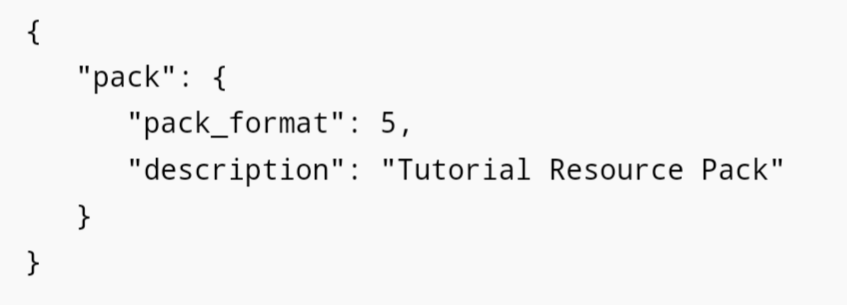
Then change the description. Do not delete quotation marks.
Posted on 18 May 2020 - 10:33 AM
I don't have a Notepad when I right click itLast edited on 18 May 2020 - 11:06 AM by UnknownFact
If you have Windows, move the file out of the folder to the desktop, right-click on it, then click on Open with.
If it doesn't show Notepad when you click on it, then click on More apps. Then find Notepad.
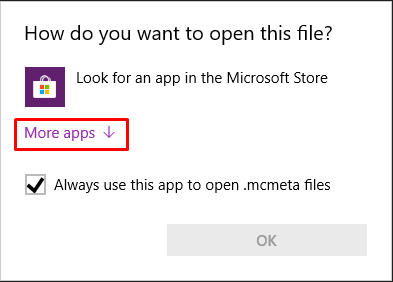
You can also download Notepad++ and then open the file through it.
Posted on 18 May 2020 - 04:40 PM
Ok so At first it says "Acidic Blitz texture pack" which got me concerned because the pack description is "Revamped By Chill Diamond"And I change it to this {
"pack": {
"pack_format": 1,
"description": "Caleb"
"
}
}
But Nothing changed
Posted on 18 May 2020 - 05:32 PM
Hello, make sure you save it as pack.mcmeta and save it to your desktop then go back to the texture pack and grab the new pack.mcmeta from your dekstop and drag it into your texture pack and if it asks to overwrite click on "Yes"