
Subscribe
issues with changing colors
Posted on 01 June 2020 - 09:06 PM
I've just downloaded the client for the first time, and I'm already having issues with changing the cps and keyboard colors. I'm also having an issue with moving the fps counter from its original position. I also can't change the size of chat, but I'm suspecting that might have to be due to my resolution.Yeah, I have a lot of problems already lol.
Posted on 02 June 2020 - 01:59 AM
Hello,newestbleach wrote
I'm already having issues with changing the cps and keyboard colors
newestbleach wrote
I'm also having an issue with moving the fps counter from its original position
Could you please elaborate more on these issues?
newestbleach wrote
I also can't change the size of chat
If you are using the new Badlion Client chat, do this to change the size of it:
1) Open the chat and click on the settings button at the top right corner of the chat.
2) Find height and length settings and change them.
If you are using the old vanilla Minecraft chat, the size can be changed through the Minecraft chat settings.
Posted on 02 June 2020 - 08:17 PM
In regards to the chat settings, I try to click the cogwheel for the settings it doesn't lead anywhere. It's like I clicked off chat.For what I mean about changing the colors; the colors aren't actually changeable, anytime I try to move the cursor to change it it just doesn't move.
In regards to the fps, cps; I don't like the positioning of where the tracker is and was wondering if there has a way to move it.
If this helps, I am on Mac so some things might be different to how Windows is.
Last edited on 03 June 2020 - 08:51 AM by UnknownFact
newestbleach wrote
In regards to the chat settings, I try to click the cogwheel for the settings it doesn't lead anywhere. It's like I clicked off chat.
Could you please check if this issue happens on all Minecraft versions?
newestbleach wrote
For what I mean about changing the colors; the colors aren't actually changeable, anytime I try to move the cursor to change it it just doesn't move.
Does this issue happen on all Minecraft versions? Is Optifine enabled or disabled? Does it happen with all GUI mods?
newestbleach wrote
In regards to the fps, cps; I don't like the positioning of where the tracker is and was wondering if there has a way to move it.
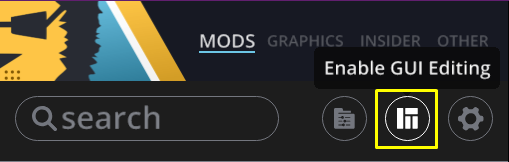
If you want to move the position of GUI mods, it can be done through the GUI editor.
Posted on 03 June 2020 - 08:33 PM
for the chat, you must go into graphics settings, and disable "use new chat":)
Posted on 04 June 2020 - 09:17 AM
yes! the same is happening to me (except for the chat issue)