
Posted on 13 June 2020 - 10:13 PM
How do I change the color of my name with insiderPosted on 14 June 2020 - 04:01 AM
Hello,To do that, open Badlion Client Insider settings, find "Chat Name Color" and then change it.
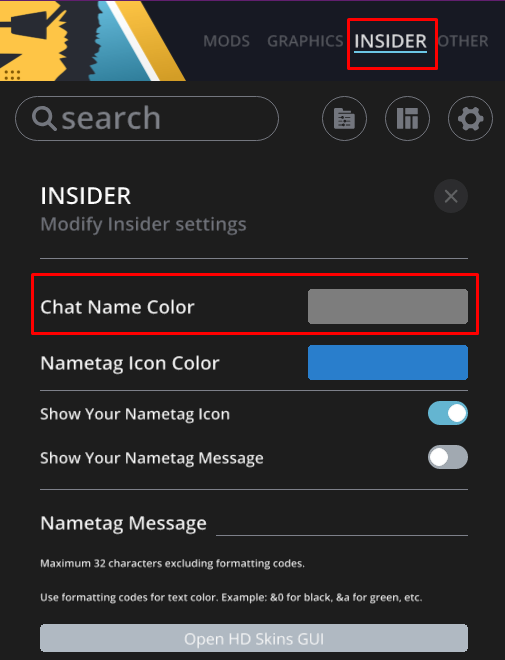
Note: it only works in Badlion Client language chats and Badlion Client DMs. More information about the new chat can be found here.
Posted on 14 June 2020 - 01:05 PM
hi, I was actually talking about the name that floats over my head.Posted on 14 June 2020 - 03:20 PM
Dypherion wrote
Couldn't tell that by looking at your previous post.
You can't change the color of your own name that you can see in the F5 mode. It depends on the server you are playing on and what color they have set for you as a player.
Posted on 14 June 2020 - 04:02 PM
No Im talking about the one that's above your actually namePosted on 14 June 2020 - 04:08 PM
Dypherion wrote
You mean your insider tag? In the same menu as the one shown in Unknown Fact's post, you can change the 'insider tag'
Posted on 15 June 2020 - 07:44 AM
If you meant the Insider nametag message, you need to use Minecraft color codes to change the color.Posted on 16 June 2020 - 11:26 AM
Ok thanks, I figured it out.Posted on 16 June 2020 - 11:27 AM
Ok thanks, I figured it out.