Store
Subscribe
Badlion Client 2.16 - Minecraft 1.16.2, Optifine 1.16 Support, Keystrokes Upgrade, & More


Hey everyone. I hope you have all been enjoying the warm weather recently and staying cool in some pools! We are here again with another update for the Badlion Client with new features, bug fixes, and more! I want to take a moment to mention that this update, and the next one (BLC 2.17) will be the LAST updates for Badlion Client 2! That's right everyone, BLC 3 is getting closer to being released and we can't wait to share more information on it soon. We will be starting to share more information on it later this month ^.^

I have another quick infrastructure update to share with you guys, feel free to read over it if you like to learn about what is going on behind the scenes.

Infrastructure Upgrades

  • Patching Service - How do you deal with almost 250K daily users on a client? You need a reliable patching service to let players know if they are up to date! We have an awesome system built to manage all of our Minecraft versions we support, and updates for these versions. Recently we've ran into a problem though where we are pushing so many updates that sometimes builds were being duplicated and causing problems. This was actually caused by a change we actually made earlier this year to help save users bandwidth and patching time (about 50% bandwidth saved). Anyways this problem with the new patching system we had put in place was causing -29 errors for users sometimes when we would push out new builds. We have made some changes to try and prevent this from happening again in the future, but are very closely watching to see if something starts acting up again here.
  • LevelHead Service - Many of you are playing on Hypixel every day. Due to the COVID-19 situation, our numbers on Badlion skyrocketed along with Hypixel. We had designed our LevelHead system to scale up to several thousand users without a problem…well what happens when it needs to scale up to 10s of thousands of users? It breaks haha. In the original design we cut some corners in order to get a product out to market faster knowing that one day we would need to go back and fix things up if we got big enough. What a good problem to have, being so big that you need to improve your software! So that's what we have done recently. We have worked closely with the Hypixel team to address latency problems, improve our lookup speeds, and implement smarter systems to ensure you all get the LevelHead data from the mod as quickly as possible. We deployed these fixes a few weeks ago, I'm sure you all noticed already.
  • ResoucePack24 Service - If you are searching for a new resource pack on Badlion Client, you are using the free services provided by https://resourcepacks24.de/ - Once again due to recent growth, we have had so many more requests coming in to find new resource packs, that we have had to increase our capacity to handle this number of requests. We have worked very closely with our friends over at ResourcePacks24 to ensure that all search requests are met with a low latency response, and that no one has any problems finding the newest resource pack to fit their game style!
  • BAC Panel - We mentioned in our last post that we were doubling down on our commitment to BAC in the coming months. Well that first stage is already live for all of our BAC partners. We have gone ahead and designed some new tools for them to be able to do their jobs easier! BAC servers can now get analytics on how many BLC users are on their server, see recent login activity on BLC users, and even see recent bans all directly from our web panel. We are going to continue to improve this web panel based on the feedback we receive from our BAC partners. Happy to help!

  • If you read through the above, thanks for taking the time to do so :) It's important for us to be transparent about everything happening here at Badlion Client, and there is always a ton of things happening behind closed doors, so it's cool to share some if it now and then. Without further ado, the rest of the update!



    To no surprise from anyone (or at least it should not be) yesterday we released Minecraft 1.16.2 support on Badlion Client! As we have mentioned in the past (and I will mention again for any new users) we will always release Minecraft updates on Badlion Client on Day 1 of release (if possible). We are always very closely watching the development of future versions of the game and making sure we are ready to tackle any problems that arise. That being said, quite a few things changed in this last update. If you find a problem, make sure to report it here: https://www.badlion.net/forum/category/4

    Optifine 1.16.1 Support

    We are excited to announce today that we have added support for Optifine 1.16 on Badlion Client! We have been working in the background for the last ~2 weeks on adding support for the latest Optifine version (which finally is a full version, yay!) for all of you that enjoy playing Minecraft on the latest version! Now you can take advantage of all of the FPS boosting technology from Optifine, Betterframes (our own FPS boosting tech), and all of the awesome mods and cosmetics all in one easy to use client! Enjoy everyone!

    FPS Profiler

    Maybe some of you noticed this in the last month, but we slipped an extra button into the "Other" menu on the Slideout menu for Badlion Client. We added a new button labeled "FPS Profiler." This button basically takes a 30 second snapshot of your game after you press the button and then spits out some data into the logs. This is part of our commitment to delivering the highest FPS possible for Minecraft in the Badlion Client. If you are having a lot of FPS problems (e.g. random dips in FPS) please go ahead, use this button, wait 30 seconds, and then submit a bug report using the bottom of the launcher. Make sure to tell us in the bug report that you want a developer to look at your FPS data in the logs!

    We will be working on some other systems soon as well to help identify pain points in the FPS performance on Badlion Client for our big Badlion Client 3.0 update coming out later this year. Stay tuned for more information on this.

    Keystrokes 3.0
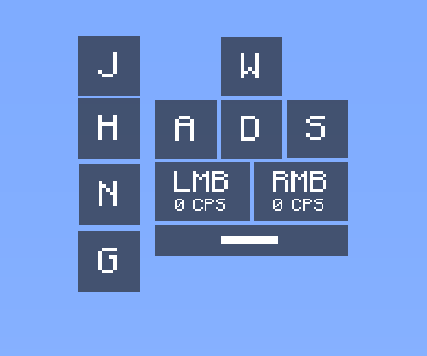


    How do you play Minecraft? Do you only use the WASD and LMB + RMB buttons? No! You use a ton of different buttons. Well we are excited to announce that we have added the ability for you to make any key visible on your Keystrokes mod now! Like to slam the shift key? Then show it! Are you a fan of using the G key because you always say "gg" after a match? Then show it! Any key you want to display should now be possible to show on the new Keystrokes mod update!

    Friends/Chat 3.0
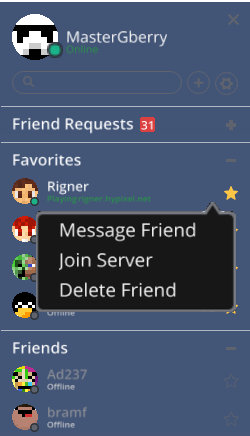


    Badlion Client is meant to be more than just a Minecraft client. It's meant to be a more social experience for the users! Today we are happy to share one of the first improvements we have to making that a reality! The Friends and Chat systems have both received an update today! First off, we dusted off the Friends menu and fixed a ton of bugs that had been reported over the last 2 years with it.



    After we cleaned out the bugs, we added support to show off where you are playing! You can now show your friends what server you are currently playing on! Not only that, you can join your friend's server too just by right clicking on their name! But wait, there's more! We now allow you to send your mod profile directly to a friend via a Badlion Chat DM in game! Wowzers, now you can avoid having to send files over other services to your friends when you want to show them your latest layout you made.

    We have more plans coming in the future with Badlion Client 3.0 and beyond to further improve the social experience on Badlion Client. We look forward to sharing more information as these features get closer to release.

    ToggleChat Mod

    Another Hypixel niche mod which has been requested quite a bit by the community is the ToggleChat Mod. This mod is a bit weirdly named, and we are looking to reorganize it with Badlion Client 3.0 and some bigger plans we have for the chat system, but until then, we are happy to share this mod with all of you! You now have the ability to toggle and hide different types of messages in the Hypixel chat such as party messages, guild messages, join and leave messages, etc.

    Anti-Xray 2.0

    One of the oldest features of Badlion Client is our Anti-Xray feature. It's no secret here that we hate cheaters. Cheaters ruin the fun and excitement that everyone gets from playing Minecraft. Our Anti-Xray feature was developed for Minecraft 1.7, but was never properly updated for Minecraft 1.8+ until today. In Minecraft 1.8 as many of you know, they changed how resource packs worked, and added a new system to allow custom models for blocks to be specified. Well many xray packs abuse this system to work. We are glad to announce that these custom model packs will no longer work on Badlion Client when trying to hollow out the block to make it see through and xray. This feature is enabled on the Badlion Client by default, and can not be disabled. We always recommend to users to not to try and cheat on the Badlion Client. While it is true we only have the entire anticheat feature set activated on BAC enabled servers (which have a BAC symbol next to them in the Multiplayer menu), it's never a good idea to cheat in Minecraft at all! Let alone on a Minecraft client that takes anticheat so serioiusly.

    Masks

    Many of you probably already noticed, but we have added masks to our shop as a new cosmetic item. While the world goes through all of the chaos and changes from COVID-19, you might as well match your in game appearance with your real life appearance by adding a mask to your avatar. Check them out on the shop here: https://store.badlion.net/category/mask/badlion

    Other New Features

  • We have added a way to use a scrollbar on items with very long metadata (e.g. a super long description) in order to see the entire information on smaller screen resolutions
  • Added a slider to choose how much blur you want in the Inventory Blur Mod
  • Added a new option to the Chat Mod to not close when switching windows in game
  • Added an option to hide the vanilla Potion Status feature in 1.14+ if you prefer to use ours (this option is available on the Graphics page)
  • Added an option to disable lava particles (which will help users with low FPS) under the Graphics menu
  • Added Dungeons Hub Warp to the Skyblock Addons fancy warp menu
  • Emotes and Sprays now are compatible with newly recorded replays and will show them when viewing them later.
  • Schematica has finally been updated to support Minecraft 1.15 and 1.16. Enjoy!
  • Added a new option to have the Block Overlay mod properly overlay on blocks such as slabs, stairs, etc.
  • Added a decimal option to the CPS mod so that it can show more precise CPS


  • Launcher Fixes

    2.16.2 Fixes

  • [All] Fixed an issue where the LMB and RMB buttons on the Keystrokes mod would be swapped

  • 2.16.1 Fixes

  • [1.16] Fixed a crash with Optifine compatiblity
  • [All] Fixed default positioning of the new Keystrokes mod
  • [All] Fixed a crash related to the new ToggleChat mod
  • [All] Fixed a crash related to the new show server option for the Friends menu
  • [All] Fixed random crashes related to resource packs not being valid and causing conflicts with our new Anti-Xray system (honestly cannot believe how many resource packs have mistakes in them)
  • [All] Fixed a crash related to the ShowProtection mod
  • [All] Fixed CPS mod text from misrendering
  • [All] Fixed Keystrokes outline color from glitching out when Keystrokes in the corner of a screen
  • [All] Fixed a bug where the default new Keystrokes was not locked together from the start

  • 2.16.0 Fixes

  • Fixed an error message that was shown when trying to register to make it more clear that your Minecraft session has expired and you need to login again
  • Fixed a long time bug to download the JSON file for a Minecraft version if it missing which prevented Optifine from being properly installed for some users

  • Minecraft Fixes

    2.16.0 Fixes

  • [1.8] Fixed a conflict with custom item textures, animations, and Optifine which could break the rod & bow textures
  • [1.8] Fixed an issue with horses misrendering due to a compatibility issue with Optifine L5
  • [1.12] Fixed a vanilla crash when items do not exist
  • [1.14+] Fixed an issue with nametags not rotating correctly in the inventory screen
  • [1.14+] Fixed a configuration error where your settings would randomly be reset if you changed screen resolution options in newer versions of Minecraft
  • [1.14+] Fixed a vanilla crash related to looms
  • [1.15+] Fixed an issue where hats were not behaving properly when the player would sneak
  • [1.16] Fixed an issue with the status effect icons not showing in game
  • [1.16] Fixed an issue where replays were not loading properly if they were made in singleplayer
  • [1.16] Fixed a conflict with Waypoints not working properly due to the wrong variable being used
  • [1.16] Fixed the hooks for the Badlion screenshot feature to work
  • [1.16] Fixed a vanilla bug due to music being played when the level was not loaded yet
  • [1.16] Fixed a crash related to chat message handling
  • [1.16] Fixed replay mod to work on realms servers properly
  • [1.16] Fixed the background color option not working on the Chat Mod
  • [1.16] Fixed the quit button going off screen on the main menu
  • [All] Fix Insider Icon above player head with shaders
  • [All] Fixed the chat length limit on BLC channels to 200 characters (which is what the actual limit was already)
  • [All] Fixed an issue with hitboxes flashing when chunks were being unloaded and loaded again
  • [All] Fixed an issue with the mipmap setting which would cause certain textures such as tall grass to look weird from a far distance
  • [All] Fixed an issue where a drop down would appear underneath other information and not on top of it
  • [All] Fixed a crash related to the HD Skin menu not receiving the server data quickly enough
  • [All] Fixed an issue where strikethrough and underline text were not showing properly on the scoreboard.
  • [All] Fixed an issue where the Jungle Axe Cooldown from Skyblock Addons mod was not working
  • [All] Fixed an issue where custom mod text would sometimes crash the client
  • [All] Fixed scrolling on the Replay Mod on the timelines to actually zoom in to where your cursor is
  • [All] Fixed scrolling to zoom in on the keyframe timeline to actually work…was broken for a long time
  • [All] Fixed an issue where the Timers mod did not properly change colors
  • [All] Fixed some consistency issues with the new Mod Outline feature from BLC 2.15
  • [All] Fixed the tall grass and double tall grass options in the Graphics menu
  • [All] Fixed the particle mod to allow vanilla values if the multiplier is set to 0
  • [All] Fixed a crash related to the Perspective mod
  • [All] Fixed the default scaling of the Player Counter mod
  • [All] Fixed the position of the vanilla scoreboard on high resolutions
  • [All] Fixed a crash related to the mod snapping feature on the GUI editor
  • [All] Fixed a crash related to the Waypoints mod
  • [All] Fixed some crashes related to the weird letter "i" that exists in Turkish (sorry guys, I just don't get it)
  • [All] Fixed waypoints being shown in the wrong dimension
  • [All] Fixed a crash when the cosmetics were not yet loaded
  • [All] Fixed scaling of the crosshair mod (and in doing so broke all of the existing setups..sorry guys)
  • [All] Fixed several crashes related to the ping mod and the new ping tracking feature
  • [All] Fixed a bug where the player would be rendered a second time when rewinding a replay
  • [All] Fixed an issue where Show Protection was not using the correct background color
  • [All] Fixed an issue where if you were holding F3 down it could conflict with Badlion keybinds (e.g. F3 + H [emote key])
  • [All] Fixed a crash related to Skyblock Addons and the taming skill
  • [All] Fixed a crash related to shaders
  • [All] Fixed an issue where custom text was not being reset when the mod was reset
  • [All] Fixed a rare crash related to opening any of the Badlion Client "overlays" in game (sidebar, friends list, emote menu, etc)
  • [All] Fixed shields misrendering when on your back and doing an emote
  • [All] Fixed a vanilla crash related to disconnecting from a server too many times
  • [All] Fixed high pings (1000+) to show nicely in the tab list when number format is enabled
  • [All] Fixed mod resizing
  • [All] Fixed misc crashes in the client


  • Launcher Tweaks

  • None, keep enjoying the launcher :)

  • Minecraft Tweaks

  • Reworked our Cosmetics management system to use a custom system to manage them instead of relying on the existing Minecraft solution
  • Updated all of our wiki links in the client to the new https://support.badlion.net/ location
  • Tweaked the shield rendering in 1.14+ to look more natural
  • Added some more safeguards to prevent crashing of Minecraft client in 1.7 when servers don't use the scoreboard API properly
  • Added PlayerCounter to the CustomModText Insider feature
  • You can change the color of chroma cosmetics on the in game store


  • As I mentioned in the beginning of the Patch notes, we are coming up on the last Badlion Client 2 update (2.17). We are going to continue to pour more of our resources into Badlion Client 3.0 to ensure that we reach our goal of a 2020 release! That being said, we will still be adding some more features and improvements to the Badlion Client in September during our last update for BLC 2. These improvements include:

  • Preparing for Badlion Client 3.0 by cleaning up and legacy things
  • We have a few new mods that might appear in the next version, but I can't promise which ones yet (depends on a few things)
  • As per usual, bug fixes and stability improvements

  • Sorry I can't share too much more information about Badlion Client 2.17 yet, as we unfortunately don't have a super solid plan yet on what we want to do for it yet. Most of the bigger items have been delayed and merged under the Badlion Client 3.0 release because they require features being made available in the newer launcher or framework setup that we have designed (e.g. new menus). I can safely say though that Badlion Client 3.0 is going to be the biggest update we have ever done, and I hope you all are as excited as I am for it.


  • None


  • That's it for the update today! As always if you appreciate our work here, consider buying something on our shop and supporting us financially so that we can remain a free to use client for everyone! If you can't buy something, then simply tell a friend to download and use Badlion Client. We love seeing the numbers continue to go up, it helps to motivate us!

    Thanks everyone!

    ~Adam
     11
    PM Link
    THE KEYSTORK MOD THE RMB IS ON LEFT AND LMB ON RIGHT
     9
    PM Link
    Very pog
     0
    PM Link
    THE KEYSTORK MOD THE RMB IS ON LEFT AND LMB ON RIGHT + why are there no gap between the w,a,s,d, lmb and rmb when I use the outline color setting do I have to do it manually?
     2
    PM Link
    epic
     2
    PM Link
    Shiny pots is broken, square are way to big and iventory looks like a junkyard now
     0
    PM Link
    Les packs de texture x ray marche encore
     0
    PM Link
    This is an epicly poggers update.
     3
    PM Link
    CIT bow textures still broken for me
     1
    PM Link
    Good update
     2
    PM Link
    El crhoma en el keystrokes esta bugueado y el rmb y lmb tambien
     0
    PM Link
    i think this update perfect but my keystrokes broken xd :C
     1
    PM Link
    Keystrokes, crosshair and scoreboard are borken :(
     0
    PM Link

    Anonymous Quote

    This feature is enabled on the Badlion Client by default, and can not be disabled. We always recommend to users to not to try and cheat on the Badlion Client. While it is true we only have the entire anticheat feature set activated on BAC enabled servers (which have a BAC symbol next to them in the Multiplayer menu), it's never a good idea to cheat in Minecraft at all! Let alone on a Minecraft client that takes anticheat so serioiusly.


    How will this stuff affect private Minecraft survival servers? In the past my friends and I have setup servers that are kinda semisurvival, where we don't play completely vanilla and have stuff like X-Ray. Could I receive a complete ban from using the Badlion client if I did this on a private server that doesn't have the server side part of the anticheat?
     1
    PM Link
    como lo actuliso???


     0
    PM Link
    Good update, but I don't see the "friend is playing xx.xxxxx.xxx" message in the friend menu.
     0
    PM Link

    Troving wrote

    Good update, but I don't see the "friend is playing xx.xxxxx.xxx" message in the friend menu.

    This is turned off by default I believe, you and your friends would need to enable it first :)
     0
    PM Link
    Great update! However, while testing the Keystrokes mod, I discovered numerous bugs, such as wrong formatting and inability to add keys. additionally, I play with my left and right mouse buttons switched, (plz no hate) and I encountered something very strange. when I would click on the right mouse button, the LMB on the keystrokes mod would light up, but it would add 1 cps to the right mouse button, and vice versa. Attached are screenshots of these various bugs.

    Please fix, Ow3z

    file:///Users/FERGUSON/Desktop/keystrokes%20break%201.png

    PS: Congrats ImpulzeGod for being in my post, or something
     0
    PM Link

    Ow3z wrote

    Great update! However, while testing the Keystrokes mod, I discovered numerous bugs, such as wrong formatting and inability to add keys. additionally, I play with my left and right mouse buttons switched, (plz no hate) and I encountered something very strange. when I would click on the right mouse button, the LMB on the keystrokes mod would light up, but it would add 1 cps to the right mouse button, and vice versa. Attached are screenshots of these various bugs.

    Please fix, Ow3z

    file:///Users/FERGUSON/Desktop/keystrokes%20break%201.png

    PS: Congrats ImpulzeGod for being in my post, or something


    Hey, could you please provide some examples of keys that will not register when adding a new one. I also tested the inverted mouse setup and was not experiencing the issue you were, is this still happening for you?
     0
    PM Link
    Perfect
     0
    PM Link