
Last edited on 31 January 2021 - 09:16 PM by ginie1

Introduction
It's finally here! Welcome to the patch notes for our largest update to Badlion Client ever! The big update that you all have patiently been waiting for, all year long, Badlion Client 3.0 is here at last! We are very excited to share this huge update with the entire community, for free of course. Our team has been crazy hard at work over the last year working on this update, and I feel it is worth mentioning everyone that has contributed to the project, and the most notable thing that they did on it. No one person makes a project, it takes a team of people to do it, and we are a very large and growing team here at Badlion. So let's dive into the accomplishments of the team:
git - Our lead developer, and the main engineer behind all of the awesomeness that is Badlion Client. He has been working on this project for over 4 years now, and his main job is to manage all of the craziness behind the scenes with our team, and keep the ship sailing smoothly forward. He also loves tinkering around with FPS, and making everything go super fast. Without this man, our project would not be where it is today. Round of applause for the hard work that you have put in this year to keep the team moving forward on this huge initiative.
Rigner - Our main devops man. He is constantly managing our growing infrastructure to keep all of our servers online as many hours up continuously as possible. He also is a core member of our client development team, and the biggest feature he contributed to in Badlion Client 3.0 was our new font rendering system that allows you use regular font files directly in all of our menus! He also spent some time playing around with Skyblock Addons…because let's be honest, who doesn't love this game mode?
yqt1001 - For the longest time, our one and only web developer…but soon we will be growing that into a team of developers! He has been our main person for the last year or so now managing all the craziness that is our cosmetic release, our store, and everything pretty in the client. His largest contribution to the Badlion Client 3.0 was his input and web perspective on the new menu building system we are using today!
GyllieGyllie - An old friend, returned to us this year! He was around for a few years during Badlion Network, and has rejoined our team with the success of Badlion Client 3.0! He also spent a lot of time in his last job working on web development, and came into Badlion Client 3.0 with a ton of experience on how to build our custom HTML/CSS system, and that is what he has done. He has been a very key member in the development of our 3.0 UIs, and helped push the project into the right direction.
Dualzz - A very old staff member…who actually got banned for autoclicking back in the day (no I will never let you live it down), returned to us many years later as a developer on our team! Dualzz has been super dedicated to the team since coming onto it at the beginning of this year, and has been working on Badlion Client 3.0 for months now. His largest contribution to Badlion Client 3.0 would also be the UI/menu building system. He worked very closely with GyllieGyllie on the system. In addition he also has worked closely with Travis to make the client FPS go up up up over the last few weeks.
powns - A long time friend of mine in the modding community, has finally made the jump into the Badlion Client team this past year. He is very well known for revolutionizing many of the popular mods oof mod, potion colorizer, block overlay, glint colorizer, and many other popular mods (and brought many of them to BLC). His largest contribution to BLC 3.0 would definitely be the mods. He also has been critical in helping to port new features into Badlion Client 3.0, such as the Quickplay mod.
Cadmik - A brand new face that joined us this year as well, has also been critical to the development of our brand new interfaces of Badlion Client 3.0. Cadmik spent a lot of time working on the input field system and designing many of the elements that are used in our interfaces. Did you know in Badlion Client 3.0 every single shortcut for navigating around input fields works (e.g. ctrl + a, ctrl + c, ctrl + v, ctrl + arrow keys, shift clicking, shift + arrow keys, etc). Badlion Client 3 has a more native feeling now thanks to Cadmik's hard work.
Biscut - Mr Skyblock himself. Anyone who plays Skyblock knows who this guy is. He has been one of the lead creators in the community coming up with cool mods for Minecraft to enhance the experience of playing Hypixel's very popular Skyblock game mode. It should come as no surprise that Biscut's largest contribution to Badlion Client 3.0 is all of the brand new Skyblock features that are now available today!
I_I - I'm not going to lie…I was pretty shaking about hiring you earlier this year, but you really surprised me and rose to the occasion. I_I (also known as tizaco), has been very passionate about his work with us here, and has really found a niche in making things run very smoothly and quickly. He has spent so much time working on speeding things up on Badlion Client 3.0 including the boot time, the FPS, and many other random things, it's crazy. Thanks for makings things fast for everyone!
Oogiya - Another new face to the Badlion team in the last few months, but quickly finding her place in the team. She has been ramping up over the last few months onto the Badlion Client 3.0 project, and has been jumping all around the client since she joined into the team. It's really hard to pinpoint the biggest thing that she worked on, because she did so many things…but if I had to pick one, it would probably be working on all of the different mods in the Badlion Client 3.0, including Skyblock Addons, Light Overlay mod, and many other things.
JacobRuby - Saving the best for last right? Well not in this case (jk, love ya bro). Jacob has joined into our team late this year as a brand new face to the team as well. He has also been working on a ton of features in the client over the last few months, and it's really hard to declare one spot that he spent most of his time. I think the best place to give him credit is fixing all of our mistakes in the client! He has dedicated a lot of his time into investigating and fixing bugs throughout the client to keep crashes to a minimum. We should start calling you Mr Stability to be honest…
Another mention for someone who is not in the development team, but has been very heavily involved in the Badlion Client 3.0 process from start to end:
ginie1 - If you know Badlion, you know Ginie. Ginie has been here since before I was (almost 8 years ago)! Badlion used to be a Faction back in the day, but grew into so much more over time, and Ginie has been here the whole time to see it along every step of the way. Ginie has been essential in helping me to plan out Badlion Client 3.0 from the ground up. Deciding what we should be focusing on, helping to maintain our quality, and testing to make things as bug free as possible. He has been super involved in the project, and without his vision and community understanding, Badlion Client 3.0 would not be so awesome, so thanks man for helping to keep us moving in the right direction! Also, when are you releasing your next war pack? It's been ages man :kappa:
There are many other awesome team members here who contribute to the success of Badlion Client each and every day. I can't write something for everyone, or I will be here all day, but thanks to our awesome Admins (Gonzaloo, Meyp, Irish_99, Listen, ScrubV2, UnknownFact, Soiree, Manuuugh, and Doblox912), as well as the rest of the awesome cosmetic artists, model designers, emote animators, testers, staff managers, senior mods, mods, translators, and everyone else I forgot to mention. All of you are vital to the continued success of Badlion Client, and we would not be here today without each and every one of your contributions to our platform.
Phew…that was a lot to type…but it is super important to me for everyone reading these patch notes, to understand that Badlion Client is a team of people. It's not a one man show, and no one person here is more important than the rest, everyone here contributes to the platform that is now called Badlion Client. Everyone on this team deserves a round of applause for their continued dedication and hard work for all of you, the players, on Badlion Client.
Now…let's start talking over the patch notes and what Badlion Client 3.0's final feature list contains! I have tried very hard to condense down the last several weeks of patch note into this forum post. I have ignored all of the bug fixes we did during the beta for the 3.0 features, and am rather focusing on the 2.0 -> 3.0 bug fixes you will notice. If you want to read about other fixes from the beta, check out the other patch notes here:
Week 1: https://www.badlion.net/forum/thread/286798
Week 2: https://www.badlion.net/forum/thread/287772
Week 3: https://www.badlion.net/forum/thread/288577
Week 4: https://www.badlion.net/forum/thread/289601
Week 5: https://www.badlion.net/forum/thread/291021
Week 6: https://www.badlion.net/forum/thread/292203
Infrastructure Upgrades

Betterframes 3.0 - Improve your FPS!
We are super excited to share that our team has been hard at work over the last couple of months taking a really deep look at Betterframes and how we could improve the technology. Betterframes is our own special sauce for increasing the FPS and stability of Minecraft, and we are excited to share that from our testing, Betterframes 3.0 is ALWAYS faster than Vanilla Minecraft + Optifine, and even faster than Badlion Client 2.0 (which was powered by an older version of Betterframes).
If you are interested in all of the options available for you, check out the BLC Options from the escape menu. We have summarized the new options below as well for you to digest with ease:
Check out all of the awesome improvements on Betterframes today on Badlion Client 3.0 for free!
3.0 Launcher
What is the first thing that happens after you install Badlion Client? You start it of course! First impressions are important? Of course they are. This is why we have taken a lot of time and effort to craft a completely new interface for our launcher, which all of you are using every time you want to play Minecraft with all of our awesome mods and features.
From the first thing you see, until you close the launcher, everything in Badlion Client 3.0's launcher has been refreshed, updated, and improved from the previous version of our launcher. This includes the updater window, the play page, our settings menu, and so many other little things throughout the client. We have gone through and cleaned up every single menu, and as many of you already probably noticed, we combined our play and home pages together into one easy to use menu!
Have you been a beta tester? Well you would know that updates are now silent and require little to no effort for you! Just start the launcher up and it will automatically restart when there is an update available! No more annoying installation dialogs each time you want to update to the latest version. Just click and go! Fast and easy is our middle name here at Badlion.
Psst…did you see the alt manager? You can now change your Minecraft account (or log into new ones) directly from the launcher as well! This way you can get directly into game from the beginning with the correct account that you want to play with!
Check out some of the beautiful animations and new menu appearance below:
Badlion Client 3.0 UI and Themes
One of the core pieces of any application experience, is the interface of the application. Badlion Client is the most popular 3rd party Minecraft client used today, rapidly approaching 1 million uniquely monthly users on the platform. We have grown so fast over the last few years (and especially this year), that we have just had to slap features into the client as quickly as we can build them to keep up with the community demand. For Badlion Client 3.0, we wanted to take a step back from the driver's seat, and look at it from the user's seat for a moment…and we were not very happy with what we saw. Many of you over the years have criticized our user interfaces, and you have had every right to do so. Almost none of our BLC 2 user interfaces matched what was created in our mockups, because we did not have the technology to do them correctly.
That's why with Badlion Client 3.0, we built a completely new menu rendering system from the ground up, and in one way or another, basically rebuilt HTML/CSS from a web browser directly into our own language. With this new menu rendering technology we have gone ahead and really spent a lot of time looking at every single piece of the UI very closely. We looked at input fields, drop downs, labels, checkboxes, scroll bars, EVERYTHING super closely and designed brand new components for every single one of these things and more in Badlion Client 3.0. This new menu rendering technology that we have developed allows us to quickly build menus (heck it's so easy, even I can do it and I don't understand anything about OpenGL or Minecraft client programming) so that we can focus less on creating menus, and more on building features.
Not only have we spent a crazy amount of time building this brand new menu system, we have gone ahead and added a very important piece of technology with this new menu building system we designed. In case you still are wondering what I am talking about, and you have not been following us on social media (you should!!!), I am talking about our brand new Theme Manager.


With the theme manager, you can now quickly and easily change between any of the available free themes in the Badlion Client. Today we are releasing two of them, Dark and Light theme. We know that not everyone has the same taste in menu designs, so that's why we have gone ahead and built a way for Insiders (our power users), to be able to go and customize their experience on the Badlion Client even further with the Theme Manager. As an Insider you can go and customize every single color in the Badlion Client interface and do some cool and crazy things with it. Did I mention you can set menus with chroma options as well?
Check out some of the awesome themes created by the Insiders by Badlion Client community members below:


If you are interested in creating your own custom theme, support the team and purchase Insider for as little as $5 on our shop here: https://store.badlion.net/category/insider/
We are also excited to share that next year in the first quarter, we will be releasing a brand new theme also for free to all users called the Classic Theme. The Classic Theme will be much more native to the vanilla Minecraft experience, and even come with a new main menu option that many of you have been asking for over the years as well. We will be sharing more information on this third flavor of Badlion Client when we get closer to the release, so keep your eyes peeled for more information on this next year.
SkyblockAddons Update
Our team has been doing a lot of home work over the last couple of months, and specifically watching very closely Hypixel's Skyblock game mode. We have been talking to many of our community members on what they would like to see in our Skyblock Addons mod. In the end of the day, we decided there were so many cool ideas existing and upcoming for this mod, that we needed to create a special layout just for this one mod. You can check out this new UI in the screenshots below:


We feel that these new categories and the search bar which is now available for all mods, you will be able to find exactly what you are looking for without any effort from your side. No more searching through 100s of options to find that one specific thing you wanted to change.
We also added a ton of new features to the Skyblock Addons mod as well, based on your feedback! Check them all out below:
Added in 3.0.10
Added in 3.0.5
Added in 3.0.0
Speaking of so many options being available on Badlion Client's system…we have something awesome to share with you below (psst…check the Global Search Menu).
Quickplay Mod
First, a shoutout to bugfroggy (https://twitter.com/bugfroggy) who has been working with us over the last few months for Quickplay's debut on Badlion Client! Without his permission, we would not be able to bring this awesome mod to all of you for free on the Badlion Client, so really, thanks for sharing with us <3. We are super excited and happy to share that this long requested mod has finally found a new home in Badlion Client.
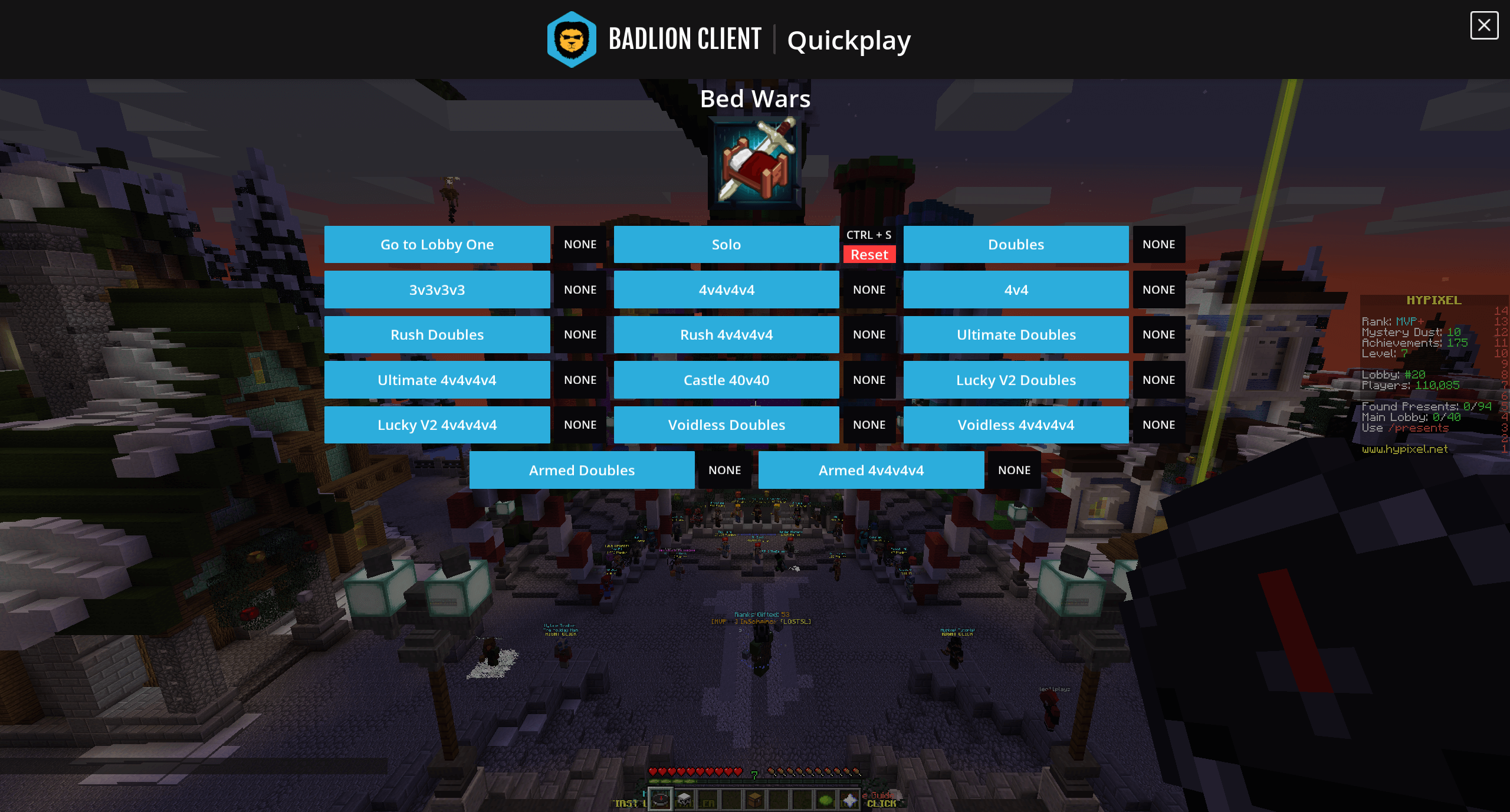
What is the Quickplay Mod you may ask? It's exactly what it says! It helps you play games quicker while playing on Hypixel, by adding a new UI component to the game to allow for you to navigate around the servers quicker. You can choose which game modes you want to play, play with parties, and much more. This is definitely an essential mod now for the Hypixel players on Badlion Client, as the AutoText mod no longer works on Hypixel due to their team disabling it (it was being abused by some BLC users). We know that many of you were using the AutoText mod to create quick macros to join your games, and now you have Quickplay to do that for you! Check out these awesome screenshots below of some of the menus made available from the Quickplay mod:

Global Search Menu
We have added a brand new menu into the Badlion Client 3.0 to allow you to find exactly what you are looking for right when you want to find it. We have a ton of options in the Badlion Client, and even sometimes myself, I can't find what I am looking for right away. My mind slips and I forgot where that specific option was that I wanted to change…not a problem anymore! We have this new awesome menu, which we called Global Search, that you can access using (ctrl + k) to find that option you wanted to locate! Type anything into this menu and we will do our best to find exactly what you are looking for and display the options for you to sift through. We even show you exactly which menu or mod that this option belongs to, so you can find the right one right away. Check out this awesome demo below of this new feature in action:
Wait a minute, did I say the keybind for this new feature was (ctrl + k)? Since when can you use multiple keys for your control options in Badlion Client? Well…
Multi-Key Keybinds
…welcome to another awesome feature on Badlion Client 3.0 for all of you power users who want to get the most out of your Badlion Client experience. We have just introduced today a brand new feature called multi-key keybinds into the client. As we continue to add more and more features into the client, we are running out of options for you to use with the Badlion Client for default keybinds. So how do we solve this? We give you more possibilities of course! Now in Badlion Client 3.0 you can set any Badlion Client keybind (not Vanilla Minecraft ones) to a single key, or multiple keys such as ctrl, shift, or alt plus another key (e.g. A, B, C, etc)!
Don't worry, we haven't broken the ability to set keybinds to ctrl, shift, or alt without a second key. This is still possible! Due to technical limitations though, these multi-key keybinds are only available for Badlion Client options, or we would break backwards compatibility with Vanilla Minecraft. Check out this cool demo below showcasing this new feature:
First Time User Menu
We have added a brand new menu into the game this week to help onboard users into the Badlion Client 3.0 ecosystem better! This first time interface will appear when you first launch Badlion Client (and have not done it already) and helps you to get settled into Badlion Client faster. It will also help players coming from Badlion Client 2.0 into 3.0 with some mod options such as text shadow, new background color on the mods to feel more native to Minecraft, etc. I have some screenshots below to showcase this new feature:
https://cdn.discordapp.com/attachments/228201048588812288/782256489699213342/unknown.pnghttps://cdn.discordapp.com/attachments/228201048588812288/782257554793037824/unknown.pnghttps://cdn.discordapp.com/attachments/228201048588812288/782267265395458078/unknown.pnghttps://cdn.discordapp.com/attachments/228201048588812288/782267319979343922/unknown.pnghttps://cdn.discordapp.com/attachments/228201048588812288/782267393304559656/unknown.pnghttps://cdn.discordapp.com/attachments/228201048588812288/783001645122322432/unknown.png
Badlion Anticheat 3.0
Badlion Anticheat has been a long term project for us here at Badlion. We have been working very aggressively over the last few years to increase the effectiveness of it, and reduce the amount of cheating that happens in Minecraft. Today we are proud to announce BAC 3.0 is out of beta and is now available to everyone on Windows that wants to use it. With BAC 3.0 comes better detection, less CPU time being used to process data, and the first step of preventing cheating instead of just detecting it.
In the past BAC only would detect cheats, and not try to prevent them from being injected into the client at all. With BAC 3.0 we are taking a more aggressive stance against cheats and are blocking them from injecting into the Badlion Client. With BAC 3.0 we have just begun this process, but we will be continuing to work on this during 2021 to make it harder and harder for cheats to be compatible with the Badlion Client.
We have also gone ahead and added more functionality to the launcher as well now. You can view the recent punishments of people who have been caught cheating on BAC enabled servers or gamemodes. There is also a spot to report people who you believe are cheating on BAC enabled servers for us to investigate.
Insider Nametags Borders
Who doesn't love to flash their creativeness to other users? We have added a brand new feature today to the Badlion Client 3.0 release called Nametag Borders, which allow you to show off some of that creativity to your fellow users. As an Insider, you are empowered on the Badlion Client platform to be able to unlock the full experience, and customize as much as possible. Nametag borders allow you to add a cool border around your name for all users around you to see, and have a ton of options built in with it. You can start off with a simple colored border around your name if you wish, or you can do something more custom with gradients and multiple colors. Check out a few examples of ideas we came up with below:
Want to show off your creative side too? Buy Insider, support our team, and flash your awesome name for the world to see directly in game here: https://store.badlion.net/category/insider/
Microsoft Login Support
We are excited to share that Badlion Client will be one of the first 3rd party Minecraft clients to support the new Microsoft login systems! This means that all new Minecraft accounts purchased starting December 1st will be able to register and use our awesome community client! This has been a crazy amount of work, and something the team had to squeeze in last minute due to the unannounced timeline from Microsoft/Mojang, but we did manage to get this supported. Unfortunately due to the way that this feature works, it will only be supported in the launcher, and not directly in Minecraft. We will make this easier to use in the future, but for the short term functionality was our main objective. Check it out below
https://cdn.discordapp.com/attachments/710751327520686130/786869860503388170/unknown.pnghttps://cdn.discordapp.com/attachments/710751327520686130/786869998085472256/unknown.png
Resource Pack Menu Refresh + Pack Profiles
We have taken a deep look at some of the core features that the Badlion Client users hold dear to them. One of these core features are resource packs. Almost since the beginning, Minecraft has given users the freedom to customize the look and feel of their gameplay experience by allowing users to change textures in the game to whatever their hearts desire. With this being such a big part of the gameplay, we felt it was suiting to give this menu a complete redesign and make it feel more like the file explorer on your operating system.

Welcome to the new Resource Pack Menu on Badlion Client 3.0! This new resource pack menu allows you to navigate your hundreds of resource packs super quickly and efficiently. Not only can you browse through the resource packs directly in game, but you can now organize them directly in game as well. You can create new folders, rename them, drag and drop the packs around, and do all sorts of other awesome things like you can on Windows or macOS! We really wanted to make this a super seamless experience for all of you, and we hope you are as excited about this huge menu upgrade as we are.
We didn't just stop there though, we went one step further and said to ourselves "How can we make it faster to swap between your favorite resource pack configurations?" Our answer was to introduce a new profile system, specifically for resource packs where you can go ahead and preconfigure multiple resource packs on a profile, and swap with the simple click of a drop down menu. Now you can have special configurations for Bedwars, Skyblock, UHC, and whatever else your heart desires!
Pack Tweaks Mod
This new mod is aimed at giving users some cool out of the box options to improve their resource pack experience in Minecraft. Some of these new options include:
If you guys have other cool ideas on what we can do with this mod, let us know!
Find your fellow Badlion Client Users
Another very early request for Badlion Client has always been to show who else around you is using the client. In the past, we were very concerned about separating the ideas of Badlion Client and Badlion Anticheat, and felt by showing who was using Badlion Client, we would confuse users with who is running BAC on BAC enabled servers. Today, after many years of hard work, we feel we have separated the two brand names enough to feel comfortable showing who is using Badlion Client directly around you without confusing users into thinking that those users are using Badlion Anticheat. So with that all stated, we are excited to share this quality of life improvement to the client experience and showcase who is using the Badlion Client directly around you (and damn are there a lot of you)! Check out this screenshot below:

P.S. If you are an Insider or Badlion Partner, your respective icon will show above your head and on the tab list instead of the regular Badlion icon :)
Outfits
Do you like getting dressed up differently every day? Well we have great news for you! We have gone ahead and improved our cosmetics system and added a brand new system for outfits directly in game. You can go ahead now and create as many outfits (aka profiles) as you want for your character in game and change which cosmetics are being used for each outfit. Do you have a Halloween outfit put together with your cosmetics from this year? No problem, create an outfit for it. Halloween is so October though, so maybe instead you want to go ahead and setup a cosmetic profile for Christmas which is just around the corner?
This outfit system is super easy to use and configure. Check out the screenshots below on how to use it and start swapping your cosmetics out quickly in Badlion Client 3.0 today!

Cursor Support
It's the little things that make something truly beautiful. With Badlion Client 3.0, we spent a lot of time looking at everything that makes a good user interface, and one of the key things we identified that helps make an interface come to life was icons. Not all icons are created equally though right? Depending on which operating system you are using, you have different icons available to you, and that's exactly what you will have in Badlion Client 3.0. These cursors are available throughout your Minecraft experience in Badlion Client 3.0, and will help all of the menus feel more alive. Check out some examples below:
Drag and Drop Support
We are living in the year 2020 (almost 2021), and the idea of doing advanced UI functions such as drag and drop is just a natural thing for many of you these days. Back in the 90s, when computers were first catching on to consumers, dragging and dropping was a brand new concept and very early in its support back in the day. Today, we can't live without drag and drop. It's just one of those things we expect to work. Well Badlion Client 3.0 brings this to life for you to do without having to think, you just do it. We have gone ahead and added drag and drop support to the mods menu, the resource packs menu, and various other spots in the client where it makes sense for drag and drop support. Check out these examples below:
Right Click Menus
Another long time piece of computer technology is having two buttons on your mouse (most have more these day of course though). Being able to left click and right click have totally different meanings depending on the application you are using. You as a user just understand today that when you right click on a menu you will have options to do certain things that you cannot do with a left click. We are bringing this natural intuition to Badlion Client 3.0 with our new right click menu system. You can right click on mods, on resource packs, on friends, and many other places in the client to be able to access options very easily instead of having to click various buttons on the interface. We hope to continue to add even better support right click support in the future with multi-level right click menus to be able to do more cool things such as moving mods around with right clicks as well (besides just drag and dropping). Check out some examples of the new right click menus below:


Minecraft Autocomplete 1.14+
One of my favorite features in the newer versions of Minecraft is the ability to autocomplete your chat. This is just such a big deal in so many various applications that we use in our day to day lives. We are excited to bring this feature to the BLC 3.0 Chat system, and we are hoping to backport it to the lower versions of Minecraft at the beginning of 2021. Check out this example screenshot below:

Other New Features

Launcher Fixes
3.0.0 Fixes
Minecraft Fixes
3.0.14 Fixes
3.0.13 Fixes
3.0.12 Fixes
3.0.11 Fixes
3.0.10 Fixes
3.0.9 Fixes
3.0.8 Fixes
3.0.7 Fixes
3.0.6 Fixes
3.0.5 Fixes
3.0.4 Fixes
3.0.3 Fixes
3.0.2 Fixes
3.0.1 Fixes
3.0.0 Fixes
Fixes since 3.0.0-beta.7

Launcher Tweaks
Minecraft Tweaks
3.0.10 Tweaks
3.0.7 Tweaks
3.0.6 Tweaks
3.0.5 Tweaks
3.0.2 Tweaks
3.0.0 Tweaks
Tweaks since 3.0.0-beta.7

Can we really do more to make Badlion Client even better? Of course we can! There can never be enough awesomeness in Badlion Client, and we have a ton of ideas for the upcoming 2021 year. The next update will primarily be focused around quality of life improvements, and shoving in some features here and there that didn't quite make the final Badlion Client 3.0 release list. Some of these things include:
The above upcoming features and improvements is a pretty short term list of what we will be working towards in Badlion Client 3.1, 3.2, etc. We have many other things on our list, but we have to sort out what the priorities are for the rest of them. Leave your ideas below and we will consider them into our priorities!


If you made it this far…congratulations. You have now read through about 5 hours of my time writing these patch notes. Thanks for making it to the end. There are so many awesome and amazing things to be excited about with Badlion Client 3.0…to be honest I can't decide which one I am the most excited about. I think for me it would probably be the launcher and the cursor support…because I spent so much time working on them haha. There is so much to be excited about with this update, I can't wait to get online and play with some of it myself.
I would like to take a moment to thank each and every one of you for helping us to get to this point in time. It's crazy how much we have exploded this past year in terms of user counts and adoption rate of the Badlion Client. We will have some awesome analytics to share with you guys soon at the end of the year when we look at the 2020 year as a whole, but damn it's absolutely insane how many of you there are now playing on Badlion Client. Thanks for helping us to get here, and I hope you all stick along for the ride into 2021 as well!
Tell us about your favorite Badlion Client 3.0 feature below. I would love to hear some of your feedback and thoughts as well! Also as a friendly reminder, if you appreciate our work here, share it with a friend! The more the merrier!
We from the Badlion team would like to wish you all a very Happy Holidays, and a happy and healthy New Year to one and all.
Thanks!
~Adam
Last edited on 18 December 2020 - 03:56 PM by runtzOG_
pog! much love to everyone that has participated in these big releases and especially a big thanks to the developers ;)Posted on 18 December 2020 - 01:43 PM
Nice, fresh.Posted on 18 December 2020 - 01:48 PM
poggersPosted on 18 December 2020 - 01:53 PM
Great update! Thank you all the people that have been working on this!Posted on 18 December 2020 - 01:59 PM
Happy to say Im switching back to BLCPosted on 18 December 2020 - 02:05 PM
Favorite badlion moment is when I met everyone :)Posted on 18 December 2020 - 02:08 PM
I have a question, why on badlion client 2 i have 600 fps and on badlion client 3 i have like 260…Posted on 18 December 2020 - 02:16 PM
pogPosted on 18 December 2020 - 02:16 PM
Second thing I’ll download on my new pc. First is mc launcher itselfPosted on 18 December 2020 - 02:26 PM
POG!!! Can't wait for the Linux release!!Posted on 18 December 2020 - 02:32 PM
Thx for releasing so fastPosted on 18 December 2020 - 02:42 PM
"Leave your ideas below and we will consider them into our priorities!"Making a proximity chat system would be a huge and awesome feature that players can talk with each other in-game, (without using mumble because mumble cause a ton of lag and no one uses it) so please add this to your list!
Also, when is the next AMA?
Last edited on 18 December 2020 - 02:49 PM by *deleted-1932250
Automatically DeletedPosted on 18 December 2020 - 03:19 PM
I don't know why but in BLC 3.0 I lag so much more than in 2.0 Does anyone know how to fix this?Last edited on 18 December 2020 - 03:20 PM by Doctor_Mario0
pogLast edited on 18 December 2020 - 03:21 PM by Doctor_Mario0
_Lqst wrote
I have this problem too :(
Last edited on 18 December 2020 - 03:30 PM by aleezuh
oops nvm idk how to delete msgsPosted on 18 December 2020 - 03:30 PM
i have a problem with chat, when im typing the messages that were before i started to type are invisible, also letters on chat are really small, there should be a way to change itotherwise, great update :D
Posted on 18 December 2020 - 03:37 PM
Probably some different settings