Last edited on 06 March 2021 - 10:32 AM by ginie1
IntroductionWelcome to the first Badlion 3 update! We've heard your feedback on the BLC 3.0 launch, we are aware of the issues with BLC 3.0 and we tackled those in this BLC 3.1 update. We've also added a bunch of requested features that you can find below. This update focuses mainly on bug fixes but we didn't forget to also create new and awesome features and upgrade our old ones as well!
I will explain more about the next update at the bottom of the post and talk about our plans for BLC 3.2 and so on. But first, let's speak about BLC 3.1.
Alternative Main MenuOne of the complaints we've heard for BLC 3.0 is that our main menu is too complex and is too cluttered for our users. We've tackled that issue and we've added an Alternative Main Menu which should fix some of these problems. This menu is optional (you can toggle it on and off from the BLC options menu). This menu's look is inspired by the original vanilla main menu but we've added our flare to it. Big thank you to Finlay
https://twitter.com/FinlayPacks for the original concept and ideas to make this menu possible!

Here's a list of the features on this menu:
Top Left icons (From left to right) Theme Manager - Replay Viewer - Language - Badlion News - Restart TutorialBadlion Logo - If you click on the lion, it will bring you to our WebsiteSingleplayer - Opens our custom Singleplayer menuMultiplayer - Opens our multiplayer menu which has your server list + BAC listBLC Options -Brings up the BLC settings menu which you can change the menu type inCosmetics - Opens up our small cosmetic menu which shows your own cosmetics + available cosmetics to purchaseOptions - Opens up the default Minecraft options menuQuit Game - Closes MinecraftAlt Manager - Allows you to change the account you are on or add an accountBadlion Store - Opens up our store so you can purchase cosmetics/ Look at themIn conclusion, we are eagerly awaiting for your feedback on how to improve this menu and what your initial thoughts are on it.
Linux SupportWe are super excited to share today with the entire Minecraft community that the Badlion Client is now available on Linux! Our development team has been super hard at work over the last few months trying to finish off the last pieces of Linux support and fixing the compatibility issues we spoke about earlier in our announcement post regarding Linux last year. Just in the nick of time for BLC 3.1, the development team was able to finalize the Linux support.
If you are a Linux user and want to experience all of the awesome Badlion Client features, now is your chance today:
https://www.badlion.net/download/client/latest/linuxWe just want to take a quick moment to thank the Linux community for your continued patience with our team over the last few months. We know that we were not unfortunately able to release the Linux version at the end of 2020 like we had hoped, but we hope you are excited nonetheless to try out the most feature packed Minecraft version available for free!
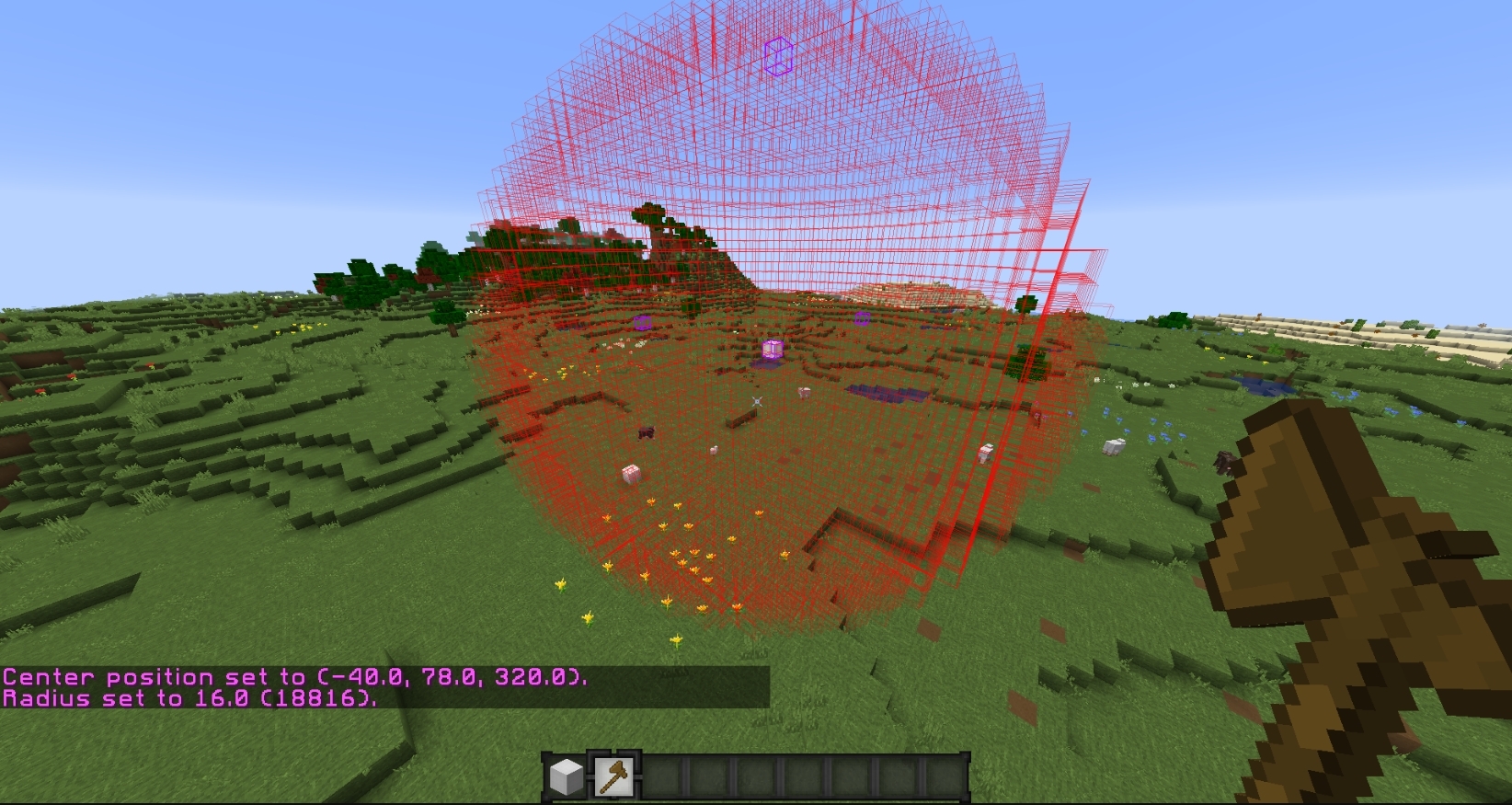
World EditThe highly requested mod "World Edit" was added in BLC 3.1. WorldEdit CUI is a visual aid mod to help builders all over the community have an easier time building their wonderful creations in multiplayer.
WorldEdit is a plugin used on servers and what this mod does is add an outline to the different kinds of selections you can make including the first selection, second selection and general borders of that selection. This is only usable on servers with this plugin installed.
✘
Sphere Selector
✘
Outline of your build
Color Saturation ModEver wanted to make the saturation of your Minecraft world look different without having to adjust your monitor settings every time? We have the mod just for you, we are introducing the Color Saturation mod! This allows you to change the saturation of your game without affecting your mods or your GUI!
SkyblockAddons UpdateA smaller update to our SkyblockAddons mod was added in BLC 3.1, We plan on focusing heavily on this mod in BLC 3.2 and make sure Skyblock is up to date and even have our own addons that we come up with! The addons that we added are listed as -
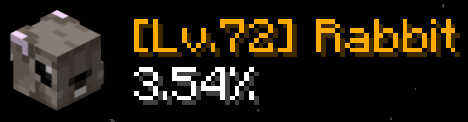
Pet DisplayWant more information for your precious new pet? This addon will showcase your current pet, you will gain information about it's level, rarity and current % of XP earned for it's current level.
Rock & Dolphin Pet CounterRock Pet Counter - Displays How many ores you have mined total, it's helpful to know if you are close to getting a milestone where you get your brand new rock pet and it's respective rarity!Dolphin Pet Counter - It will display how many sea creatures you have fished. This will help you know if you are close to a milestone to get the respective rarity of the dolphin pet.NotEnoughUpdatesWe are excited to bring to you our own version of the auction house for NEU. You will be able to open the Auction house menu wherever you are with a simple press of a button!
Here is a list of all the features from this addon!
Filter by categories & sub categories - Get exactly the kind of gear you are looking for!Dungeon filter - Filter by the tier of the dungeon itemSorting - From highest bid to lowest, from lowest to highestItem Tier Filter - From supreme to common, you can look at the rarity of items in a simple click of a button!BIN Filter - Filters "buy now" itemsEnchant filter - Do you want an item without enchants? This is where you can look for items with a clean slateShow My auctions - Shows your current auctionsSearch bar - Look up any item by name in the search bar fieldColored Enchant Names & Max Enchantments ColorsWant to find an item with the enchantments you need on Skyblock? We got just the right option for you! With this addon, you will be able to change the color of all your enchantments, pick between which color goes on which enchant and you will have the option to make all the max level enchantments stand out on your precious items!
✘
Custom Enchant Colors
In BLC 3.2, we will be merging this mod with SBA to make sure everything is located in the same mod to make it easier to find Skyblock related mods.
Mod Scaling & Text SizeWe are glad to showcase to you guys two long awaited features that plagued the way our mods looked for a long time now. These fixes should make our GUI much smoother to look at and should fix any issues with resizing mods.
Mod ScalingAwhile ago we changed the way our mod scaling was operating and it created a bunch of issues with our mods. We have decided to go a new route and make sure that the mod has a static scaling instead of a system based on your screen resolution.
Making your screen smaller and going full-screen will not change the location of the mods anymore and they should stay where they are (Extreme cases might break this, be aware). This means that now your mods will stay consistent from every time you launch Minecraft to every time you minimize the game.
Mod Text SizeWe've had a lot of complaints/suggestions to fix the way our mods look and make the font of them fit better with our widgets. We have now created a way to change the size of the text of your mods! Anything from CPS mod to Keystrokes mod, we have you covered.
Menu ScalingA BLC 3.0 issue we've encountered was that when you resized your screen, our menus would not scale and they would go out of bounds. This issue happened because of two reasons:
1. We made our menus based on 4k monitors
2. We didn't have a scaling system in place
We've fixed these issues by adjusting them to 1080p and also added a scaling system. This system will make it so that if you make your screen smaller, the text/buttons for the menus will adjust itself and should still be readable. (Warning if you go too small, there's not much you will see).
Item TrackerEver wondered if you've picked up those golden apples in a UHC? We've got something for you, the Item Tracker mod!
This mod will allow you to display what item you're picking up and what you're dropping out of your inventory. You can customize the duration of how long the item stays on your screen & the color of the text!
✘
Item Tracker
New BLC/Insider iconsWe decided to update the look of our icons and make them more appealing to the eyes. We replaced the circle shape to a diamond shape, we updated the size of the icon itself and we've added a black outline surrounding the diamond shape.
Here's a picture showing how they would look in-game now.
✘
Icons
Optifine UpdateVery happy to say we've updated our OptiFine builds to the latest available. This change will improve our users' stability and performance. Let us know if you encounter any issues with the latest build!
Updated to OptiFine 1.8.9_HD_U_M5Updated to OptiFine 1.12.2_HD_U_G5Updated to OptiFine 1.15.2_HD_U_G6Other New FeaturesFor our hardcore users that love new additions to existing mods, we updated our current mods to have new features/new looks!
This is not the last time we will do something like this so make sure to keep being updated with BLC updates. One of my favorite things to work on is finding ways to make our mods look better and come up with new ideas to make the older mods look fresh.
Here's a list of features we've added to our existing mods.
Hitbox Mod - Allow users to change the size of your hitboxes. Useful for example if you want your arrow hitboxes to be bigger so you can dodge them easierHitbox Mod - Fixed an issue in 1.7 where your hitbox would be above your headMod Border] - Now you can change the size of the outline around your mod (mod border)CPS Mod - We've added a "combined" CPS option which will display your LMB and RMB at the same timeChroma text shadows - We've fixed the issue with Chroma/Rainbow not working properly with text shadowsBreathing Effect - This effect is now fixed and should work on every modChroma/Breathing/Rainbow Speed Slider - We added a way for you to change the speed of how fast your Chroma/Rainbow/Breathing Effect displays itselfArmor Status - We've changed the complete look of this mod, text being too far/items not being at right spot. Now the default look of this mod will match our other mods and fit in nicelyCrosshair Mod - We've added a "circle" option for our dot in the middle of the screen (we only had a square before)Particles Mod - New options were added to this mod, you can now decide if the "multiplier" slider will affect your critical or your sharpness particles.Animations mod - Changed the animations mod to have most of the animations on by default when making a new profile or resetting the modWeapon Cosmetics - Added the item cosmetic to your hotbar (So if you have a sword or shield you will see the icons in your hotbar instead of the default Minecraft items)Potion Status - Added the ability to change the color of every different potion statusBLC Launcher UpdateThe Badlion Client launcher now will automatically detect when a Minecraft crash occurs and submit it to our servers to analyze. We now have a way to group similar crashes together and this will help us to find and squash bugs faster that are a widespread issue for users. We are now prompting users on the Badlion Client launcher with this new information instead of asking for bug reports to be submitted.
Please note, this feature is only available on Badlion Client 3.0 and above.
Launcher FixesFixed log spam in certain situations where network connection was unavailableFixed some random network errors that some users may have been experiencingFixed an issue where Optifine installations would sometimes fail and not correctly report the errorMinecraft Fixes3.1.3 Fixes[1.14+] Fix Crash in 1.14+ caused by unknown keys[All] Fix fps mod simple mode and reset between simple/fancy changes[All] Fix chrome in simple mode of mods[All] Fix separator color not resetting for cps mod[All] Fix Global Search Menu key not resetting correctly[All] Fix crash from ToggleChat filters[All] Fix nametags being visible while being blinded[All] Fix crash when color was missing in custom mod text[All] Fix HUD not updating when switching resource pack with fps boost on[All] Fix BLC3 not working on Chromebooks3.1.2 Fixes[All] Fix a crash caused by Custom Mod Text[All] Second attempt at fixing a crash in one of our fps optimizations3.1.1 Fixes[All] First attempt at fixing a crash in one of our fps optimizations[All] Fix shadow being misplaced on unicode characters in our MC font[All] Move the option to enable Badlion Font for nametags from Insider menu to the main settings menu3.1 Fixes[1.7] Fixed an issue with blocks/items being different sizes on the ground[1.7] Fixed an issue with OpenGL making BLC icons next to your name translucid[1.7-1.12] Fix replay viewer crash[1.12] Double nametag with shaders[1.12] Fixed misc entity metadata crashes[1.14] Trident infinite fly Weather Changer Mod[All] Chunks will occasionally not have lighting applied to them[All] Borderless not working correctly[All] Quickplay causing users to crash[All] Optifine Crashing with Custom Items[All] Resource pack priority was inverted[All] Fixed a bug where your crosshair mod settings would not save[All] Text centering being wrong on the keystrokes mod[All] Mod tags being broken[All] Bazaar helper causing crashes[All] Skyblock Fancy warp menu having scaling issues[All] 3.0 Chat freezing in place[All] Mods detach from the top of the screen when resizing[All] Light Overlay mod not working correctly[All] Players flashing when chunks loading with FPS boost on[All] Insider Nametag Character Limit[All] Glasses and Masks cannot be used at the same time[All] Cursor going in the middle of the screen[All] Slider for font size[All] Glasses and Masks cannot be used at the same time[All] Mods snapped to each other start overlapping when resizing[All] Text on widgets disappears with FPS Boost Off[ALL] Fixed a WorldEdit CUI crash[ALL] Fixed QuickPlay Crash[ALL] Fixed mod profile crash[ALL] Fixed font manager crashing on some messages[ALL] Fixed potential Replay Mod crash[ALL] Fixed builder's wand block overlay crash[ALL] Fixed crash related to backpacksBugs we fixed in between 3.0 to 3.13.0.14 Fixes[All] Changed resource pack entry order in menu.[All] Fixed some backpacks not showing up[All] Fixed ToggleChat mod on 1.8[All] World disappears after rename fix[All] Fixed the vertical alignment for mouse button texts[All] Fixed mipmap cosmetic textures (Cosmetics should look better now)[All] Fix replay viewer crashes[All] Fixed incorrect slider value bug, fixed chroma/rainbow/breathing static color bug[All] Fix Autotext NPE[All] Fix moving servers to first position[All] Fixed positioning playercountermod[All] Fixed 1.12 chat rendering when FPS Boost is off.[All] Fixed lighting issues with item fast render.[All] Reset title/subtitle when logging off server[All] Fix itemcounter resetting, fix some issues with keystrokes[All] Fix cosmetics resetting due to nametag update[All] Fix create category bug in mod menu3.0.13 Fixes[All] Fix issue with cursors being wrong[All] Fix issue with keybinds not unlocking when closing menu[All] Anti-xray updates for 1.16.5[All] Disabled background color for new profiles for the saturation mod[All] Fix SBA fancy warp menu portal positions3.0.12 Fixes[All] Fixed BLC 1.8.9 map markers, seems to fix* dungeons map.[All] Fixed builder's wand block overlay crash + misc. tweaks.[All] Fix some model manager crashes3.0.11 Fixes[All] Fixed an issue with borderless fullscreen not using the correct height/width[All] Fixed an invalid texture path for the color wheel (which would make it not load)[All] Fixed a crash related to the bazaar helper in the Skyblock Addons mod[All] Fixed mod tags in the profile system to work for when uploading/downloading mod profiles[All] Fixed a crash related to the item counter mod3.0.10 Fixes[1.12-] Fixed an issue where players would be invisible sometimes in replays[1.12] Fixed perspective mod not working with the keybind[1.12] Fixed crosshair mod to be compatible with Optifine[1.14+] Fixed a crash related to the server list loading too quickly[1.14+] [macOS] Fixed a scaling problem where menus were not working due to the mouse cursor loading in the wrong location[1.16] Fix a crash related to custom items[All] Fixed outline rendering on buttons and other components with an outline[All] Fixed an issue where new mods were not alphabetically being sorted into the default category[All] Fixed an issue where emote/spray settings on page 2 and higher did not work[All] Fixed NickHider mod not functioning at all[All] Fixed an issue where the color picker did not save your choice in the cosmetics menu[All] Fixed a crash related to the emote system loading[All] Fixed a crash related to the slayer manager in Skyblock Addons[All] Fixed a crash related to the Minimap mod[All] Fixed a crash related to the Keystroke mod[All] Fixed an issue in the controls menu where the sliders did not work correctly[All] Fixed an issue where mouse clicks were being registered when dragging the mouse in the replay timeline[All] Fixed icons looking blurry in the various menus, very clean and smooth now[All] Fixed a crash related to the TimeChanger mod[All] Fixed an issue where active resource packs could not be re-ordered (thus changing the loading order)[All] Fixed a crash related to the dungeon manager[All] Fixed an issue where the outline was not properly rendering on the center mod menu around the mods[All] Fixed an issue where the reset camera rotation and sync timelines did not work correctly[All] Fixed another crash related to the keystroke mod[All] Fixed a crash related to reading the patch notes if you had never read any before[All] Fixed an issue where the online player list did not show in the multiplayer menu[All] Fixed a crash related to the direct connect menu on the multiplayer[All] Fixed a crash related to SkyblockAddons and backpacks3.0.9 Fixes[1.7] Fixed perspective mod not working with the keybind[1.8] Fixed an issue where Skyblock Addons outlines were always active[All] Fixed the color wheel to show properly in the cosmetics menu[All] Fixed an issue where panels on the main menu would not remove properly3.0.8 Fixes[All] Fixed an issue where the color picker in the cosmetics menu was not visible (it was there though…just hidden), we will make it even more visible later with a new icon[All] Fixed the custom mod text menu to allow drag and drop properly[All] Fixed sliders to follow your mouse cursor properly and not lag behind[All] Fixed some more problems with limited FPS and scrolling3.0.7 Fixes[1.14+] Fixed a crash related to the new cool tab complete logic[All] Fixed an issue related to the font width not properly being calculated and overlapping as a result[All] Fixed an issue where skins were not properly being rendered in replays sent to other users to open and use[All] Fixed an issue where chat would break completely if you clicked a hyperlink in game3.0.6 Fixes[1.12] Fixed an issue where tipped arrows all had the same texture with Fast Item Render enabled[1.14+] Fixed a crash with shaders in the Skyblock lobby[All] Fixed an issue where there was a white background on the creative inventory[All] Fixed font resizing #RignerIsTrash (his words, not mine)[All] Fixed a crash related to the Skyblockddons ExpGlobes feature[All] Fixed an issue where online profiles were not opening correctly[All] Fixed another issue with Quickplay mod causing problems with profiles[All] Fixed an issue with the replay timeline menu opening multiple menus incorrectly and then completely breaking[All] Fixed an issue with Backpack feature from Skyblock Addons crashing users[All] Fixed an issue where the motion blur slider was not allowing all possible values to be selected3.0.5 Fixes[1.7] Fixed some OpenGL errors when opening a menu[All] [macOS] Fix another problem with font management causing visualization glitches[All] Fixed an issue where nametags were sometimes not rendering with the fonts correctly[All] Fixed a problem with Keystroke mod not loading profiles correctly[All] Fixed an issue with the new font system sometimes rendering the layers incorrectly and displaying things on top of each other incorrectly[All] Fixed an issue where corrupted profile files could cause crashes…again[All] Fixed an issue where Quickplay mod was writing bad data into the profiles (our fault entirely)3.0.4 Fixes[1.7] Fixed dropped item scaling[1.14] Fixed an issue where two chat windows were showing[1.14+] Fixed perspective mod to work properly with Optifine compatibility[1.16+] Fixed the TimeChanger mod with Optifine compatibility[All] [macOS] Fixed some issues with the font system not working in BLC 3.0 and randomly becoming black[All] Fixed an issue where Keystroke mod was not properly showing up when creating a new mod profile[All] Fixed an issue where players could use the global search feature and bypass disabled mods[All] Fixed an issue with Betterframes option "Fast Item Render" displaying the enchant glint in the wrong location[All] Fixed a crash related to Quickplay mod and corrupting mod profiles[All] Fixed an issue where if you were the most popular person ever, and saw a LOT of chat messages, it would stop showing them eventually3.0.3 Fixes[All] Fixed a problem where some chat messages were disappearing[All] Fixed a few crashes related to Nametag borders3.0.2 Fixes[1.16+] Fixed a crash where singleplayer worlds were not loading properly[All] Fixed an issue with multiple keybinds being used and zoom (e.g. crouching and trying to zoom at the same time)[All] Fixed an issue where the friends menu wanted to be so friendly, that he ran away from his assigned location[All] Fixed an issue where the non-compact chat mod would not show messages sometimes[All] Fixed a crash related to certain keybinds such as alt, ctrl, etc.3.0.1 Fixes[1.14+] Fixed a crash related to lighting[1.16.4] Fixed a bug where the replay menu would not open[All] Fixed client freezing when resizing the chat[All] Fixed a crash related to the enchant glint mod[All] Fixed a crash related to pasting too much data into an input field[All] Fixed chroma option on keystrokes mod[All] Fixed the perspective mod to actually do something besides laugh at you[All] Fixed a crash related to Skyblock addons and backpacks[All] Fixed a crash related to JustEnoughItems[All] Fixed fancyfont to work on nametags
Launcher TweaksAdded a new CDN for our growing user base (we are using now around 1 PB of data per month thanks to all of you)Swapped to a new proxy system for more stabilityChanged log names to make them easier to read/findAdded more graphics cards to our fallback list for more stable game play for older PC's[macOS] Performance improvement for Minecraft patchingMinecraft TweaksFixed an issue of text going out of bounds in the resource pack menuUpdated the default look of our mods by default (background color)Added the ability to change main menu in the first time user interfaceAdded a move to category button when right clicking a modUpdated the look on some menusUpdated cosmetics to look better in older versions (Was already in newer versions)
We are very happy with how BLC 3.1 has turned out. Hopefully you guys will love it as well! Make sure to let us know of any feedback you have for this update and let us know any features you would like to see for BLC 3.2 & BLC 3.3! Here's the list of features we will be looking at adding in BLC 3.2 & BLC 3.3 which we are very excited to start working on!
More FPS ImprovementsUpdating our SkyblockAddons to be at the latest release & create our own addonsBedwars modsReplay mod fixesNew menus everywhere!Bug fixesCommunity Ideas!These upcoming features and bug fixes are a pretty short list of what we will be working towards in Badlion Client 3.2 and BLC 3.3. We've heard your thoughts on our menus and we will be looking at updating them for BLC 3.3! We will be bringing a new menu designer that is more familiar with how Minecraft menus should look like and we won't be repeating the same mistakes as BLC 3.0! Thank you for your dedication and patience!
Replay mod being buggyNewer versions have more bugs than we anticipated
In conclusion, we are very excited to bring you this update. make sure to test it out and give us any feedback you'd like to see for the future of the Badlion Client! Make sure to report any bugs so we can look into it and fix them as soon as possible! We can't wait to start working on BLC 3.2 and bring even more highly requested features to our growing player base.
Huge shout out to @
ScrubV2 for the huge help as our dedicated QA tester and his team, if this update is smoother than others it's mainly because of his effort and work dedication.
Thanks!
~Ginie