
Posted on 21 April 2021 - 05:36 PM
When i joined Hypixel today (on badlion) (4/21/2021) I noticed that everyone was a Steve or Alex skin. When I joined Skyblock I noticed that the number of items that usually shows over the stack in the inventory was under the items meaning I couldn't see how many items there were in that stack. I also noticed that the heads (not on players) were also steve heads. What is going on?! (it isn't the texture pack)Posted on 21 April 2021 - 06:17 PM
I am having a similar problem, The items are overlaying the damage counter/number of items. It is very confusing and a little bit aggravating.Posted on 21 April 2021 - 07:18 PM
I tried fixing it by enabling and then disabling nick hider, but there was no fix.Posted on 21 April 2021 - 08:05 PM
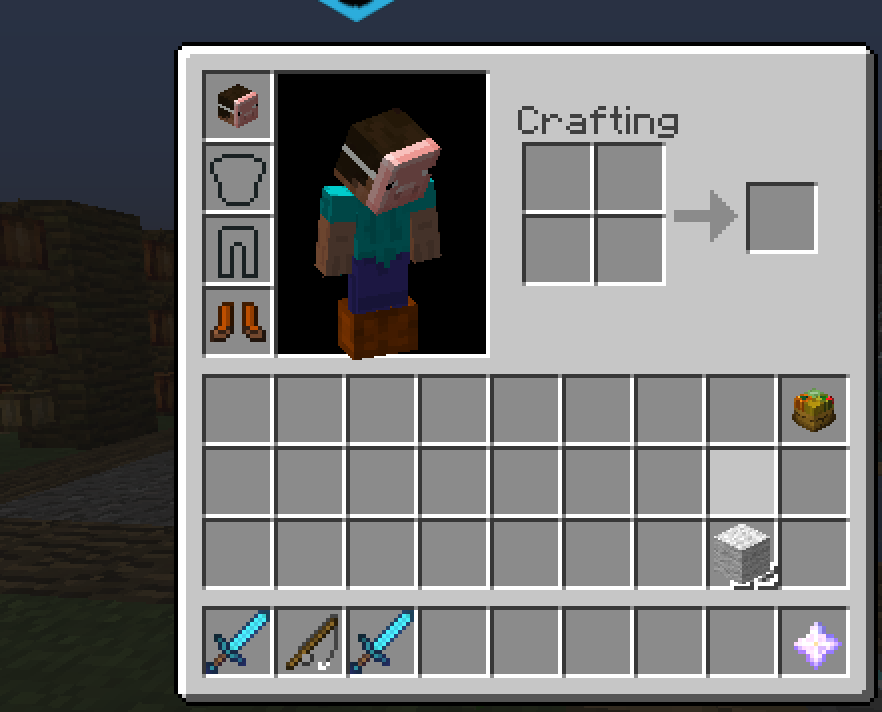
I am also having the issue where the item amount is under the image of the item in the inventory. I went on the vanilla Minecraft launcher to see if the same problem occurred in the same server, and it didn't seem to happen, so I think it is a BadLion issue.The issue does not occur when the item is in the hot bar, and it only occurs when the player is in their inventory or in a chest.
Screenshots attached.
Posted on 21 April 2021 - 09:38 PM
regretak wrote
The issue does not occur when the item is in the hot bar, and it only occurs when the player is in their inventory or in a chest.
Screenshots attached.
Try disabling “item fast Render”
Press RSHIFT > Graphics > BetterFrames
Last edited on 21 April 2021 - 10:08 PM by NoYouDefend
fqzing wrote
Skin sessions might be down.
Also Try disabling “item fast Render”
Press RSHIFT > Graphics > BetterFrames
Posted on 22 April 2021 - 12:22 PM
After restarting my computer over night the problem has fixed. Thank you all for answering and helping me!Posted on 22 April 2021 - 12:28 PM
You’re welcome!