
Subscribe
Minecraft won't start?
Posted on 13 December 2022 - 01:14 PM
I have a problem with the client, when I click on launch everything loads but in the field where "launch" was written is now standing "running" but minecraft does not start. When i close the client it asks me if im shure to close because Minecraft is Running. What could be the problem? Graphics card drivers are up to date (Rx480)Posted on 13 December 2022 - 01:17 PM
Hey,Make sure to do the following steps: (For Windows)
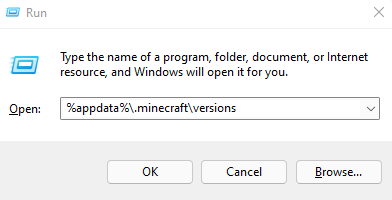
- Open Run by pressing on "Windows+R"
- Type "%appdata%/.minecraft/versions/BLClient/PRODUCTION3"
- Delete the corresponding version folder for the version you are trying to launch, e.g "1.8.9"
- Restart your PC
- Try to launch it again.
Also make sure any firewalls, VPNs, anti viruses, 3rd party authenticators, or similar are not blocking any Badlion client connections.
If that doesn't help submit a bug report from the bottom of the launcher, and explain the issue.
If you have any issues with it or running on another OS or issue please let me know.
Sincerely
Mistel_Panda
Posted on 13 December 2022 - 01:28 PM
The first thing did not work. How do i know if something is blocking Badlion?I also heard that older graphic cards are not supported, could that also be the issue?
Posted on 13 December 2022 - 01:31 PM
Hey,Especially old graphic drivers. You can check your drivers for updates to make sure they are up to date.
If you are using a VPN, firewall or Antivirus, they could block your client. We recommend turning them of for the duration of the launching process or creating an exception for Badlion. (remember to switch it back on once Badlion Launched Successfully)
Sincerely,
Mistel_Panda
Thread is locked