
Last edited on 07 December 2023 - 11:50 AM by ginie1

The Badlion team is super excited to announce the official public release of the project we've been working on for the past couple of months!
Badlion Client 4.0!
Make sure to update your Launcher to access Badlion Client 4.0!
What is the Badlion Client 4.0?
Super excited to reveal what we've been working on for the past few months.
Like some of you have noticed, we have been running a lot of surveys lately, we used those surveys to determine what you guys believed would be a good direction for the future of the Badlion Client.
We focused on the 3 main points that our community has been asking for:
1) FPS Improvements
2) UI redesigned
3) New mods
With that in mind, we are open to feedback and suggestions on how to better the user experience for everyone involved, so don't be afraid to give feedback!
Download the Badlion Client Today!

FPS Improvements
Without going into details, we've been working hard over the last few months on improving frames and lag spikes on the client.
You might notice NEW settings in the Betterframes menu! Some of these settings are red/forced disabled which is normal for now, we will be releasing more of them as the weeks go by to make sure everything is as stable as possible.
You will notice a huge array of improvements across the board, a big improvement we worked on was improving your performance when having a higher distance.
Depending on your PC specs at 32-64 render distance you can expect a 1.5x to 4x FPS Improvement.
MAC
I'm also happy to say that we found a lot of amazing performance improvements for MAC users!
MAC users will see a massive increase of potentially 3x their performance!
Mod Menu Redesigned & Unification of Lite & Regular

Badlion Client Lite and Badlion Client Regular are now merged into one client. The original idea for Badlion Client Lite was to create a simple way to experience Minecraft without a bunch of extra settings that the average user wouldn't need to use. With time we noticed that it didn't make sense that we had 2 versions of the same client with different flaws.
What's the goal?
Unite both versions and make the best version of the Badlion Client possible. Focusing our time on one UI and seeing direct results via our analytics will be way more fruitful and easier to manage.
What's new?
- Lite style with aspects of the Regular UI
- Ability to change the size of mods via the icon next to the search bar
- Moved the filter to be similar to Badlion Client Regular
- New Sorting option called "Enhanced Mod Sorting" in the Menus settings
- New Toggle Animations & Look!


Feedback!:
1) Do you want the ability to change the font for Badlion Client Menus?
2) Different square sizes? Ability have more/less mods on your screen
3) Do you want to see a fully new side menu?
4) What do you think is missing from this menu?
Skyblock Menu
We also reverted our Skyblock Mod Menu to look basically the same as our Default Main menu. The main difference is that on Skyblock, the Skyblock mod is always going to be at the top of your mod list.
A Fresh New Launcher

Not only does the Badlion Client 4.0 have significant improvements in-game. We have also put in a lot of time into improving the experience of our launcher! All of these improvements were made based on our community feedback and surveys! Your voices matter and shape what we do here at Badlion everyday!
This is the first step with many more steps to follow. Keep reading to find out!
No More Admin Permissions Required
For the past 5 years, Badlion Client has required admin permissions to both install and open the launcher (unless you enabled the boot on startup option). The reason this was necessary was due to the Badlion Anti Cheat (BAC) which required these permissions to be the most effective anti cheat in Minecraft.
With the removal of BAC we have now been able to make all the necessary changes to remove any need for admin permissions!
Improved Settings

We also made some improvements to our settings options.
WHAT ABOUT SKINS?!?
Ah yes, the beloved skins tab. First it was 2022, then 2023 and now it’s… 2024 :(
I want to take a moment to talk about why skins were removed in the first place. For many users this page would load exceptionally slowly, it was taking up too high an amount of hardware resources and just overall did not make sense to keep up.
At the start of next year, we will be revisiting this feature to reimplement it back into our launcher. For now, you can use the skin changer mod that we have in-game! Keep an eye out for updates on the launcher skins system!
What else is coming?
The list of ideas we have for improving the Badlion launcher is quite large. A lot of these ideas we are not ready to share yet and will be seeking your feedback on preferences in the coming months. For now though I would like to share the following features you can expect to be coming SoonTM.
Crosshair Mod - Ability to draw crosshairs

We're here to showcase one of our cool new additions, the ability to draw your own crosshair!
Location: Crosshair Mod -> Canvas Tab
Want to make cool art and use it as your own crosshair? Look no further, we are now offering a way for you to make this a reality!
How to use it:
Simple use your mouse to draw pixels on the canvas in the crosshair menu!
1) Left click - Draw Pixel
2) Right click - Delete Pixel
3) SHIFT + Drag Left click - This allows you to select bigger areas and draw the appropriate color in it.
4) SHIFT + Drag Right click - This allows you to select bigger areas and DELETE the pixels in it.
Features:
Here's some cool crosshairs I made in a few minutes :P


Feedback:
1) Do you guys want higher resolution support like 64x or 128x?
2) Do you want a place where we display all the shortcuts and what keys you need to use?
3) Anything annoying with it that you would want changed? Let us know!
M1/M2/M3 Mac Support
Badlion Client 4.0 now supports Mac M1/M2/M3 so make sure to try them out and let us know of any issues you may encounter! With native support players using Badlion Client on any of these chips will see a big improvement in FPS. In some of our testing we saw up to a 4x increase compared to 3.0!
Shake Slider
A feature that was requested by our PVP community was to create a slider for the "Shake effect" that you encounter when you get hit.
We already had the feature called "No shaking" in the animations mod but you only had the option of
Shake effect is basically whenever you get hit by another player/take any sort of damage, your camera tilts slightly to the left which can be a bit annoying. With this slider, you have control of the entire effect!
Location: Animations Mod -> Make sure "No shaking" is not enabled and you will see the slider!
HUD Mods - More Options
Minecraft HUD mods have been a thing for YEARS and they've always looked the same or similar which can get boring over time. With these new options, we plan on giving a lot more customizations to everything!
Rounded Corners Option For HUD Mods
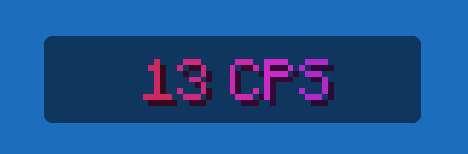
Our first shot at this is making the corners of mods have a rounded edge which should create a nice aesthetic.
Location: Any HUD mods (FPS, CPS, ETC) -> Enable Rounded corners!
Feedback:
1) Do you guys want the ability to make it more round?
2) Ability to make the mods into different shapes aka "Circles, Squares, etc"?
3) Any other customizations you would love to see?
More Mods Added
Color Gradient for text/backgrounds
We added a bit more color options that our beloved community has asked for. You can now select two colors and make them follow a gradient pattern to have some unique customizations.
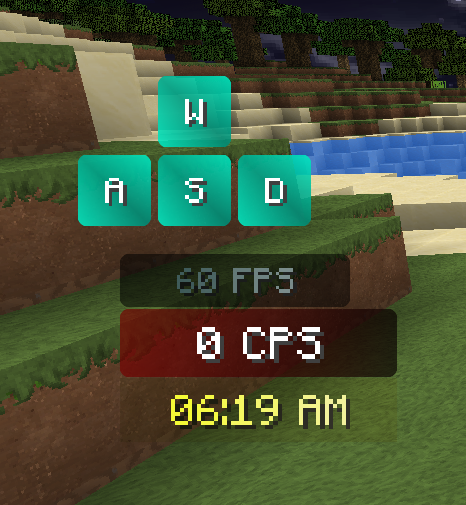
Location: Any HUD mods (FPS, CPS, ETC) -> Color picker -> Select gradient from the dropdown

We're excited to bring this new version of the client to the public to see and use. In the coming weeks we will be working on ironing out any issues you may encounter with the client. Make sure to leave us any feedback, we look at all of them!
I hope everyone has a wonderful time with family during the holidays, from the Badlion team we thank all of you for the support over the year, it wouldn't be possible without you!
- Ginie, Senior Product Manager Of The Badlion Client
Last edited on 07 December 2023 - 01:45 PM by _DokiDokiBae_
firstPosted on 07 December 2023 - 12:23 PM
nice dudePosted on 07 December 2023 - 12:28 PM
Love These Features!!!I Have 2 questions 1 related with the client itself and 1 with the whole gifting system.
1. Im Having a problem where I play a game like skyblock and I get spammed notifications saying something like Mod profile cant update and sometimes when I log back in my mods are completely reset which is frustrating for a player like me who has everything how I want it.
2. This is probably a dumb question but are we allowed to promote out gift requests anywhere for ex. In forums, youtube etc?
Much appreciated,
Have a good day!
Posted on 07 December 2023 - 12:54 PM
anoyone gonna talk about texture pack mod bieng removed and fbs drops happening all the time making it unplayeblePosted on 07 December 2023 - 01:10 PM
Really cool update but has a ton of issues;1. Frames are dropping on Nvidia GPU's, I tested my RTX 4080 along with a RX 7800XT and my 4080 performed better but with tons of lag spikes.
2. FPS decreased, BLC 3 had better framerates than now but this may just be me.
that's all tbh
Posted on 07 December 2023 - 01:12 PM
Hype!Posted on 07 December 2023 - 01:27 PM
WoWPosted on 07 December 2023 - 01:34 PM
W Badlion updateGo check it out! We testers had a field day on the first day looking for bugs, but most of them should be patched now :)
Posted on 07 December 2023 - 01:42 PM
Nice Update!I have one question: What about the badlion font or fancy font whatever you call it. Is it removed or something. I really liked it and now everything is in minecraft font.
Posted on 07 December 2023 - 01:45 PM
Well I found fancy font for the scoreboard but not for other gui elements. HmmPosted on 07 December 2023 - 02:05 PM
I really do like this update to Badlion! it's exciting, cleaner but the only problem I've been having is lag spikes it's kind of frustrating sense I've had lag spikes a lot in general, they have gotten worse… anyways great job Badlion looking forward to the next updates!!Posted on 07 December 2023 - 05:58 PM
How about fix SkyBlock textured head not working and add neu stuff :)Posted on 07 December 2023 - 08:37 PM
since the launcher updated, while playing skyblock my power orb has the text "armor stand" above it. how do i get rid of that? none of the mods are showing they are affecting it.Posted on 07 December 2023 - 08:49 PM
BAdlion just keeps crashingPosted on 07 December 2023 - 09:00 PM
BruhPosted on 07 December 2023 - 09:52 PM
my fps has dropped a lot from this updatePosted on 07 December 2023 - 10:13 PM
很好Posted on 07 December 2023 - 10:45 PM
how to get small item sizePosted on 08 December 2023 - 01:33 AM
please add trails for player