
Last edited on 23 May 2019 - 02:17 AM by MasterGberry

Hey all. Today I am here to share our latest update for the Badlion Client. We are finally finishing some of the items on our TODO list from almost a year ago, and we could not be more proud today to share them with you. Let's dive straight into the patch notes and then at the end discuss the next steps for Badlion Client.


The latest version of Minecraft is finally supported on Badlion Client! This has been a huge undertaking that our team has been working on for the last 6+ months. I would especially like to recognize @git who was the primary dev working on this feature and planning all of the necessary steps out for us to make this possible. We had to build a lot of extra custom tools to support newer versions of Minecraft, since some of the community resources have slowly been disappearing.
Our plan is to be supporting the latest version of Minecraft on day 1 of each release (and if not day 1, very close after an update). This means every single feature you know and love in the Badlion Client including Mods, Anticheat, FPS Boosting Tech, etc will all be available on day 1 of each new Minecraft version. No more need to wait for Forge and all of the mod makers to update their stuff, we have you covered!
If you are interested in reading more about Minecraft 1.14, check out the patch notes here: https://minecraft.gamepedia.com/Java_Edition_1.14
Chat 2.0
We are super excited to share the latest changes to the chat system in Badlion Client. When building the initial chat system, we had a vision of helping to connect Badlion Client users with each other. With this overhaul of the chat system, we hope to reach this goal now that we have fixed some core issues with it.
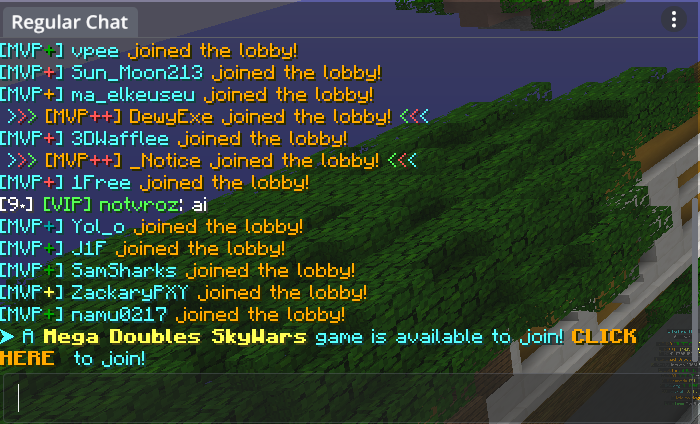
We have made a new default for the chat system on Badlion Client (which you can access on any screen in Minecraft using T). This new chat appearance is much more minimalistic so we take up less of the screen on smaller monitor resolutions. This is completely based on your feedback and we hope you all enjoy it.
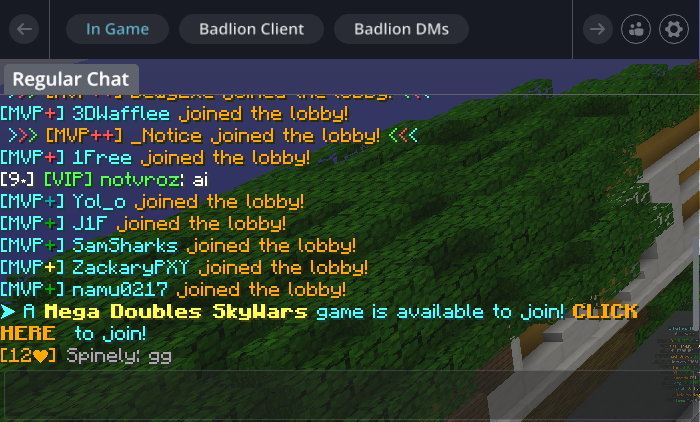
For the users with a larger resolution who want to click around less to switch channels, we have the non-compact chat GUI. This adds an extra row of tabs instead of having to use a drop down, which results in less clicking around to change between channels.

Want to know when you get a DM? Now you can easily keep track of people messaging you by looking for the chat bubble notification in the bottom right corner of your game. Here you will be able to see how many messages you have pending, or a + if you have more than 9. You can also choose to disable these bubble notifications in the chat and friends settings if you want to as well.
On top of the new GUI stuff explained above, we have also:
Music (Spotify) Mod

We are excited to share with the public the first version of the Music Mod on Badlion Client. Currently we only support Spotify, but based on demand we will slowly be adding more music providers and possibly even the ability to share playlists with each other. You can now directly control your Spotify music in game with all of the standard controls you would expect.
How do I setup my Badlion Client with Spotify?
1. Open the Badlion Client Launcher
2. Click the "Spotify Connect" icon on the right side of the main menu.
3. Give us permission to control your music for you on Spotify
4. Launch Minecraft and start using the mod
Why can I not start/stop music? I don't have Spotify Premium
Due to limitations with the Spotify API, we can only grant READ access for users without Spotify Premium (e.g. no controlling the settings of Spotify from in game). You can still display on the mod what you are listening to, how far you are into the song, etc, but unfortunately you cannot use some of the controls such as start, stop, skip, previous, etc.
ItemPhysic Mod

Another popular request by the community for almost a year now, we are finally supporting the ItemPhysic mod. Now you can have items be thrown or lay on the floor in a more realistic appearance, which also makes it easier to identify what you are looking for. Check out the screenshot above!
FPS Improvements
We have gone ahead and implemented some further FPS improvements into BLC 2.7. Mostly we spent time fixing up some things that had to be disabled from BLC 2.6 last minute because they were not working as intended. Simply have the FPS Boost option enabled in the Graphics menu to take advantage of these improvements to your FPS!
Other New Features
None

Launcher Fixes
Minecraft Fixes
Other Fixes


Schematica Mod
We have had a lot of requests recently from Faction servers to add support for the Schematica mod who are interested in using BAC to protect their servers. We are planning on making this our highest priority after 1.14 support is available to the public. We hope to release this along with BLC 2.8 in June (in 3-4 weeks from now ideally). Please don't hold me to that time frame, but this is our goal.
We will have a special way for servers to enable the printer mode on Schematica to ensure that they want that feature enabled (to prevent server anticheats for banning because of weird movement etc). Otherwise by default you will not be able to use the printer mode unless a server specifically gives it access to activate.
Replay Mod
We are planning on creating our own version of the popular replay mod due to some open source licensing issues. We are planning on supporting the existing replay format (.mcpr files), so you can use old replays and also create new ones in the Badlion Client.
This feature will probably come out later in summer with BLC 2.9. We will have more information on this as we begin the development for it.
Small Mod Improvements
We have a few small items on our TODO list to improve your BLC experience, below you can find a few of them:


That's all for this update today. We are really happy with the recent growth of the Badlion Client in the community, and we are expecting to break 12,000 players this weekend (a new high). We are sorry that this update took longer to come out than we expected it to, but we want to ensure that every update is very smooth and as bug free as possible. Cleaning up all the Chat 2.0 problems and 1.14 Support took us way longer than we anticipated.
Keep an eye out for some new cool cosmetics coming to the client in June as well :)
~Adam
Posted on 22 May 2019 - 02:14 PM
Automatically DeletedPosted on 22 May 2019 - 02:49 PM
Daigo wrote
I don't believe we are aware of any memory leaks in the client currently. If you know of one, please feel free to create a bug report so we can fix it :)
Posted on 22 May 2019 - 03:32 PM
item phisics is an awesome mod! greatful it has been added, also the music mod is great and i love it!Posted on 22 May 2019 - 03:37 PM
Add TCPNoDelay again pleasePosted on 22 May 2019 - 03:55 PM
n1tr0xz wrote
It already exists, this is only in 1.7 because 1.8+ has TcpNoDelay built in by default.
Posted on 22 May 2019 - 04:12 PM
I miss old blc chat, a lot. Any ways to get the old blc chat back ? The new one just don't fit at all with my gui, and it was way easier for me to chat.Posted on 22 May 2019 - 04:44 PM
Music dosn't work it just says to connect to spotify i already linked it…Posted on 22 May 2019 - 05:16 PM
Music wont work I connect it but it wont connect and i cannot use the modPosted on 22 May 2019 - 05:36 PM
SupPosted on 22 May 2019 - 06:20 PM
HYPE!Last edited on 22 May 2019 - 07:25 PM by maxiovo
hypePosted on 22 May 2019 - 09:19 PM
so if a server hasnt said they want schematica printer we cant use it? what about on smaller servers?Posted on 22 May 2019 - 10:09 PM
Please help me, Me and my friends always use badlion client but we cant play for some reason because it says authenticating…it wont log us in or anything.
PLEASE FIX!!!!!!!!!
Posted on 22 May 2019 - 10:16 PM
I can't use the music mod it just says Please Link Spotify but, when I try it won't load it just keeps loading!Posted on 22 May 2019 - 10:18 PM
Same.. );-Fxxne
Posted on 23 May 2019 - 02:16 AM
BRYAN_73 wrote
You can edit the Chat settings by hitting the three vertical …'s
Posted on 23 May 2019 - 07:57 AM
Yes finally the item physic modPosted on 23 May 2019 - 08:06 AM
to the Schematica Mod account, as for me it is not necessary to add it, since it will kill the whole build mode of the battle.But with replay mod is a very cool idea.
Posted on 23 May 2019 - 08:44 AM
YEET! so hype for item physics so yay! thx admins! :D