
Last edited on 19 November 2019 - 06:00 AM by MasterGberry
Welcome to the newest Badlion Client update! We are excited as always to share what we have been working on the last month and a half. We are currently in a huge internal process of cleaning up things and preparing for another huge change log for Badlion Client 2.11, which will release right before the holidays.
We have spent a lot of time in the last weeks adding and improving the SkyBlock AddOns Mod, improving our GUI Editor to allow for easier scaling/sizing of mods, making it easier to align and move mods together, fixing bugs, and many more things. Check out the full patch notes below!

Skyblock Addons
First and foremost, a quick shout out to Biscuit (https://biscuit.codes/) who created the original version of the Skyblock Addons mod. He has been super supportive to us and we are excited to bring his work into the Badlion Client today.
So what is Skyblock Addons? Skyblock Addons is a mod designed for Hypixel's newest game mode, Skyblock which has taken the Minecraft community by storm. It's a PvE (Player vs Environment) game mode where you spend your time gathering resources, fighting mobs/bosses, and evolving your home (island). If you are interested in learning more about Skyblock, you can check out the official forums on Hypixel's website here: https://hypixel.net/forums/skyblock.157/
We plan on continuing to add new features to the Skyblock Addons mod as time goes on as well, so keep an eye out for new features every now and then.
Below is a list of the currently live features from the Skyblock Addons Mod:
macOS Closed Beta
I am super super super SUPER proud to present macOS Badlion Client (insert Apple Bootup Sound from the 90's).

Yes at long last, the Badlion Client has made it off of a Windows Only Client, and we welcome macOS users to the Badlion Client family! We are excited to have you join us starting today during Closed Beta.
Where do I download Badlion Client for macOS?
I highly suggest you read the rest of the information below, but if you just want to dive straight into the client here is your download link: https://www.badlion.net/download/client/latest/mac
What does Closed Beta mean?
Closed Beta means not everyone can use the Badlion Client Mac version currently. You can download the client, but it won't launch until you upgrade your account to Insider rank ($5 for 1 month). We have put together a nifty guide showing exactly how to download and install the Badlion Client for macOS here: https://www.badlion.net/wiki/macos-beta-guide
What Features are missing?
Everything is part of Badlion Client on macOS except for Badlion Anticheat (BAC). BAC is specifically programmed for Windows, and has years of work behind it which could not simply be ported over to macOS at the current moment. We will look into if this is possible to achieve at a later date in time.
Badlion Client for macOS has everything else still that you expect from Badlion Client such as FPS Boost, Cool Cosmetics, 40+ Mods, Chat, Friends, Emotes, and more! Your Minecraft experience is about to get a huge upgrade with Badlion Client for macOS.
When will Open Beta be?
We don't have a planned date for when closed beta will end and when open beta will begin, but we hope that closed beta will end before Christmas. It heavily depends on the number of bugs that are reported, and how long it takes for us to fix them.
How long did macOS support take?
This has been a side project of mine for around 4-5 months now. It took a lot of time and effort and many of my weekends were spent working on this instead of spending time with my girlfriend. So make sure to give her a quick thank you on Twitter for letting me spend my free time on this instead of spending it all with her: https://twitter.com/ItsIrish99
Will Badlion Client come to Linux?
This heavily depends on how large of an adaption rate we see from the macOS users. If we see a decent increase in our user counts due to the macOS version, then we will most likely look into porting Badlion Client onto Linux in 2020. We will share more information on this at the start of next year.
Cosmetic Menu 2.0
Today we are excited to share some long requested features for the Cosmetics system in Badlion Client, and they all are in the new Cosmetics Menu!
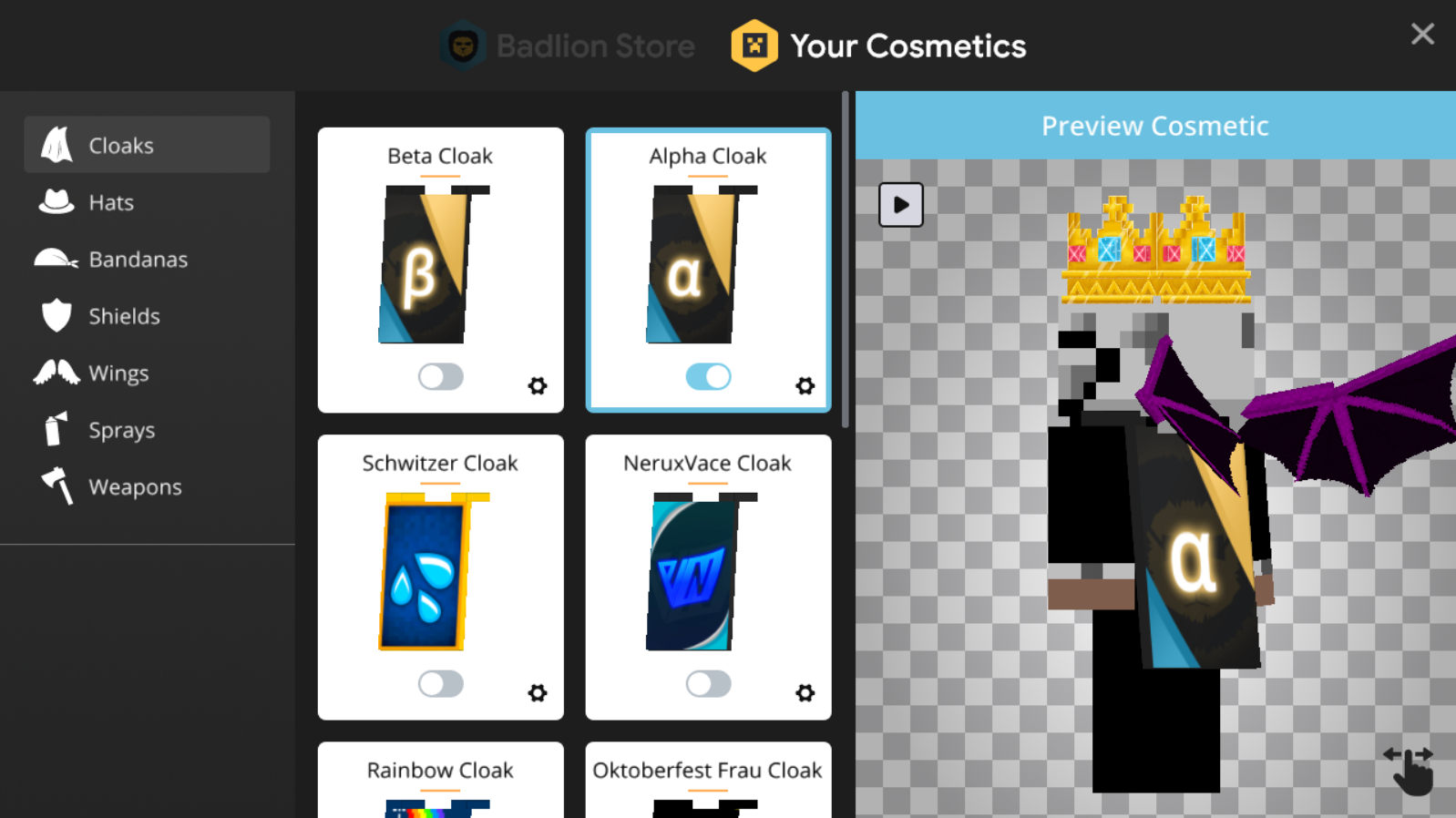
As you can see from the screenshot above, we have a ton of improvements and new features which I will outline below:
We believe these changes will make it easier to change your existing cosmetic character design, as well as allow users to have the chance to see how cool they would look with certain cosmetics on their character model before buying them on our shop.
GUI editor
One of the largest appeals to the Badlion Client is all of the awesome built in mods. We understand that it's very important to our users to be able to customize their experience with all of these mods, and that's why we have spent time over the last few weeks polishing up one of the core features of the Badlion Client, the GUI Editor.
In this update we have added a new "Simple Mode" (under Graphics menu) to act a bit more simple/easier to position/scale mods the way you want to. With the new "Simple Mode" we have disabled mod rescaling based on your screen size. The positive is that you no longer have to worry about font stretching weirdly, the negative is you might have some mods overlapping depending on how you resize your screen. We have some further improvements/customization options coming in BLC 2.11, so hang tight for those to really get the full power of the GUI Editor.
We still have some really cool improvements to share, to which I have some cool little gif's below:
Guide Lines
As part of the new GUI Editor, we have now made it easier for you to align the mods pixel perfect to each other. As you can see above, special red guidelines will now show up and snap into place with another mod's position if you get close enough. This makes it super easy to figure out exactly how to align all of your mods.
Nine Quadrants
As part of the new "Simple Mode", we have added a new nine quadrant system into the game to help position mods in the correct locations. Depending on which quadrant the mod(s) are in, will impact where they get shifted if you do decide to resize the screen.
Keybind Overhaul
What is a video game without keybinds? Boring, that's what it is, it's boring. Badlion Client as you all know adds a lot of extra functionality on top of the core game of Minecraft, but it's not always been the easiest to navigate around the interfaces. We get it. Over the coming updates we are focusing some effort into making it easier to use the Badlion Client. One of these improvements was adding a single place you can find all of the keybinds available on Badlion Client instead of searching in each individual mod. So what better place to put them where you actually would expect to find them? On the controls menu!
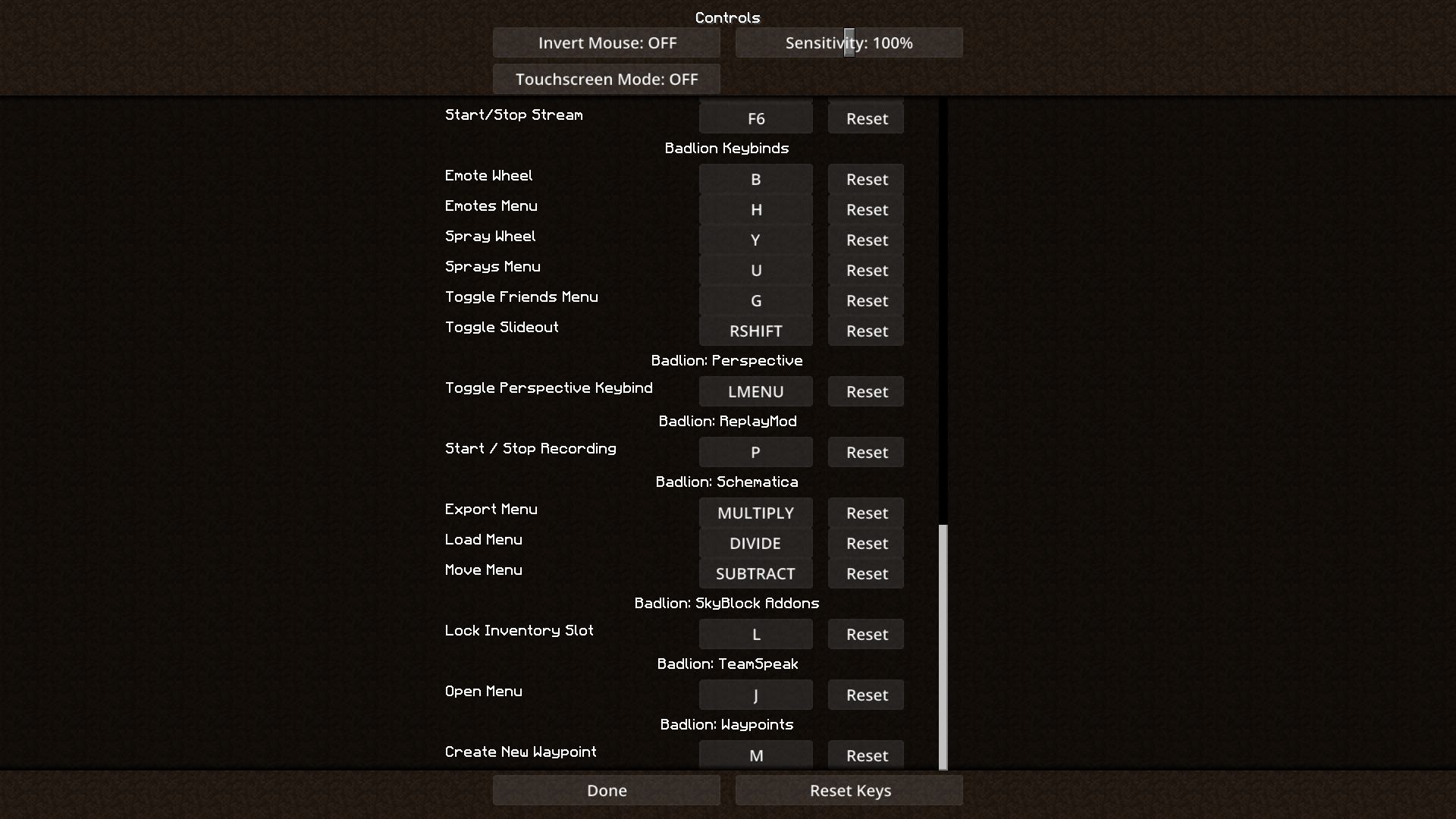
As you can see above, we have added all of the Badlion keybinds to the main Minecraft controls menu. So now you never have to worry about finding that one keybind for a certain BLC feature again, because you can find them all on one easy menu. Don't worry though, we haven't removed the old keybind locations (in the mods/features directly). You can still edit them there as well.
Warning About Existing Keybinds
Do you prefer the old way of editing keybinds for Badlion Client features? Well we have good news for you, we now warn you when you are setting a keybind to an already in-use key!
Now you don't have to worry about accidentally setting two things to the same keybind in the Badlion Client!
Swapping Minecraft Versions
Do you enjoy playing 1.8 and 1.14? Do you hate having your keybinds being reset between versions? That's a thing of the past now with Badlion Client! We now remember your keybinds for you! You can now swap between versions on the Badlion Client and not have your keybinds be reset when you swap between newer and older versions. How cool is that?
Cloaks 2.0
Ever want to fly around in Minecraft like Superman? Guess what? You can now! We have gone ahead and given Cloaks a much needed tune up to make them cooler and more unique than anything else in Minecraft.
I present the new Dynamic Curved (now default) version of Badlion Cloaks! Look at the flowing in the wind! Our cloaks now behave like you actually would expect for a piece of cloth tied to your neck! We feel that this more realistic version of Cloaks will be enjoyed by the community.
Don't like the new version of cloaks? No problem, just go to the "Graphics" menu on the Badlion Client Slideout and change it back to Rectangle.
P.S. This setting of Dynamic Curved vs Rectangle now syncs to all other players instead of being a local setting :pogchamp:
P.S.S. We added a way to way to disable shoulder pads now as well on the Badlion Cloaks if you really don't like them. It's also on the Graphics Menu.
P.S.S.S. We plan on moving all of the cosmetic settings into the new Cosmetics menu as well so they are in a more logical place.
Sprays
Have you been living under a rock? Or have you been too busy placing your sprays under rocks? We released sprays about a month ago during our Halloween Cosmetics release, and with these new sprays you can paint your favorite image for every other Badlion Client player to see. It's very similar to our emote system, and you can access the spray wheel with "Y" and the editor menu with "U".
Nick Hider Mod
First, a quick shout out to Sk1er (https://sk1er.club/) for giving us access to the source code of his Nick Hider mod to integrate into Badlion Client. The Nick Hider mod makes it possible for you to hide your nick name (if you are disguised) when playing on servers like Hypixel. The mod is primarily aimed at streamers who don't want to have their identity revealed on stream. This mod is now built into the Badlion Client free of charge of course.

Launcher Fixes
Minecraft Fixes
2.10.3 Fixes
2.10.2 Fixes
2.10.1 Fixes
2.10.0 Fixes

Launcher Tweaks

Mod Profile Manager
As we continue to move forward and offer more customization options in Badlion Client, we want to revisit one of the earliest parts of the project and overhaul it, the Mod Profiles. Right now you have a very basic system which just allows you to make multiple profiles and change the name. We plan on improving the UI of this module, but we also want to add new features! Some of the new features we are planning on adding are:
We feel like this set of changes will bring the Badlion Client 2 Mod Profile system up to our standards of a fully fledged module in the Badlion Client. We hope you guys are excited, as this new mod profile system will be appearing in BLC 2.11.
Mod Improvements
We have plans to clean up and improve almost every single mod in the Badlion Client over the next 2 patches. We plan on offering multiple versions of almost all of the mods including "Text Mode" and "Graphics Mode" if possible. I'll briefly explain what these terms mean:
Graphics Mode - Basically every mod existing in the client is a "Graphics Mode" mod. It has a background color, some text, a border, padding, etc.
Text Mode - A very minimal text version of the mod with little to no padding, no background colors, similar to the F3 screen.
We know there are users who don't like the bigger mods we currently have, and this is why we will be introducing Text Mode as an option in 2.11.
GUI Editor
Most of the GUI Editor improvements have been released with BLC 2.10. The only one that did not quite make the cut was the resizing multiple mods together. We built a really cool system to allow you to lock mods and resize them together, but we couldn't work out all of the issues before release of BLC 2.10, so we pulled it out for now. We will release this in BLC 2.11 instead along with the other planned Mod related improvements.
Insider Improvements
We have several Insider features planned for 2.11. It's been a while since we have given them some love, and they deserve all of the love because the people who are Insiders are directly supporting our development team! If you want to become an Insider check it out on our shop here: https://store.badlion.net/category/insider
We will tease the new features on Twitter and Discord as they become available. No sneak peaks yet :)
New Mods Approaching
We have a few small items on our TODO list to improve your BLC experience, below you can find a few of them:


We are excited for everyone to try out the new Skyblock Addons mod on Badlion Client along with all of the other core improvements we have rolled out with this update. We are also looking forward to BLC 2.11 where we will get to finish the second half of a huge update and share some awesome new features along with holiday cosmetics before Christmas arrives. That update is planned to come out in 5 weeks right before everyone gets time off of school.
If you appreciate our hard work on this client, share it with a friend. Seeing our constantly increasing user base motivates us to keep adding new features and improvements to the client!
Thanks.
~Adam
Posted on 15 November 2019 - 11:44 AM
FIRST OMG YAY I WAS WAITING FOR THIS FOR SO LONGPosted on 15 November 2019 - 12:32 PM
nutsPosted on 15 November 2019 - 12:45 PM
Longest patch notes record beaten again? Very proud!! Great work on getting 2.10 and Mac support out so quicklyPosted on 15 November 2019 - 08:39 PM
yessss omg i wanted addons so bad and my friend can play on mac nowPosted on 15 November 2019 - 10:34 PM
im happy that the sb addon is in this update, but i want to know how to force change the sizeX and sizeYPosted on 16 November 2019 - 10:33 AM
I hope you can add some other languages (such as Chinese) in the game.All the mods in the game are all English. I'm feel headache.From a loyal Badlion Chinese player.
My English is not good XD
我希望您可以在游戏中添加其他语言(例如中文),游戏中的所有mod均为英文。我很头痛。
来自一个忠实的Badlion中国玩家。
我的英语很烂XD
Posted on 16 November 2019 - 02:33 PM
I'VE BEEN REQUESTING THE MEMORY, TIME, TEXT AND COMBO MOD FOR SO LONG! THANK YOU!!Posted on 16 November 2019 - 06:00 PM
Badlion 3.0. Badlion on IOS, and Android.Posted on 17 November 2019 - 04:28 AM
Okamics wrote
I’m not sure how this would be possible as I’m not even sure if you can mod pocket edition Minecraft but seeing how much time mojang is putting into bedrock, this might be an opportunity.
Posted on 17 November 2019 - 04:30 AM
SheepYhangCN wrote
From a loyal Badlion Chinese player.
My English is not good XD
我希望您可以在游戏中添加其他语言(例如中文),游戏中的所有mod均为英文。我很头痛。
来自一个忠实的Badlion中国玩家。
我的英语很烂XD
Now I’m not sure if this is only mandarin/Cantonese or both but you should be able to find it in the launcher’s settings
Posted on 17 November 2019 - 12:39 PM
It was a joke but okLast edited on 17 November 2019 - 12:51 PM by hopeHQ
Finally I can use Badlion Client with macOS. I just hope that it will be released before Christmas.Posted on 18 November 2019 - 11:19 AM
I recently downloaded the client, does anyone have any tips on using the BLC? Like any options/features that would make it more enjoyable?Posted on 18 November 2019 - 11:20 AM
Also, suggestion: Allow people to open games at once. Basically, so we're able to be online with 2 accounts at the same time.Posted on 19 November 2019 - 02:11 AM
Why I have ERROR downloading this jar file?Last edited on 20 November 2019 - 07:55 PM by Checho_S
amigo…tengo un problema…la 1.7.10, 1.14.4 andan re bien…pero el problema esta en la version 1.8.9..Cuando se instala entro al juego..luego se crea el mundo y esta todo mal generado..bugeado nose como explicarte
Posted on 20 November 2019 - 07:56 PM
osea se genera mal la version 1.8.9….reinstale todo el cliente de nuevo pero sigue el mismo problemay hoy se actualizo ..pero igualemnte sigue el problema de generacion del mundo..
Posted on 20 November 2019 - 08:24 PM
estuve un rato en el mundo mal generado editando los mods…y se arreglo el problema…nose como paso pero se soluciono despues de estar jugando un ratoLast edited on 21 November 2019 - 04:58 AM by ssissy_boy
good!