
Last edited on 28 May 2021 - 05:00 AM by GyllieGyllie

Hello everyone,
Welcome to the first Badlion Client Developer Blog! In these blog posts we'll be giving you all an insight how some of our Badlion Client features work and explain how we have come to these designs. In this first post we'll be discussing the new Mod positioning & scaling system we've implemented in the BLC 3.2 release. This system is used by mods we call Render Mods as they render something on the UI and includes mods like CPS, FPS, Player Counter, etc.
This new mod system will increase stability of your mod profiles, prevent them from bugging out, and create an overall game play experience for all of you. Most of you won't even notice any new changes, because the system just works and will keep your mods the way they were before the changes.
Previous System and its issues
The base of the old system was started in the very early days of the development process for the client. Over the past 3 years this system was adapted, expanded and built upon based on the needs of new mods we were adding at that point in time. Of course during this process we always had to make sure we didn't break how existing mods already work and how their information was already stored in the profile from our users. Here is a quick brief explanation how this information used to be stored in the old system.
First of all we divided the screen in 32 boxes horizontally & 32 boxes vertically. Using these boxes we stored the box it is in and a relative percentage compared to the top left of position of the box.
Using this for every render mod we stored 3 positions:
- Top Left Corner
- Middle Point
- Bottom Right Corner
Using these 3 positions we calculated the size of the mod & it's position. Along with this we also stored what mods were locked or snapped against it and on what side.
Now the main issues with this system is that the stored values were constantly being updated when you were resizing the screen, going in/out fullscreen, adapting a mod setting… Basically it was updating your profile way too many times what often resulted in profiles breaking completely, causing new mods to be hard to add or adding new functionality into existing mods on this "old" system.
Coming up with a solution
A couple weeks ago we decided it was time to think about a new solution and design. During this process we first listed everything the system requires to work for the current mods and also keep in mind flexibility for future plans. Multiple solutions came up during the discussions but at that point we also accounted for all the issues we've had in the past trying to add new features, issues our users have when using the old system and a system possible to be migrated to without resetting everyone's setup.
After discussing everything needed we came with a solution we call the Box System.
The new solution
The Box System is in short words an abstract piece of software that is designed to work completely on its own, even outside of Minecraft and our mod code. It's only purpose is to handle "boxes" that have a certain place & size on the screen and update them when the screen resizes. Here is a quick video of how it works in a prototype version before we dive more into how it works.
As mentioned above this system is build around boxes. Right now we only have 3 type of boxes:
- A normal simple box which is just completely on its own. Has its own position and size information stored
- A grouped box which also has its own position and size but also has a list of sub-boxes linked to it
- A sub box which is part of a grouped box and holds relative position & size compared to its grouped box
In the video above you can see examples of each type as well as 1 box (top middle) which showcases a box which changes size during the rendering process since some of our mods have to become wider/smaller based on what they are displaying. These boxes stored their default size and just adapt the position on the moment of rendering.
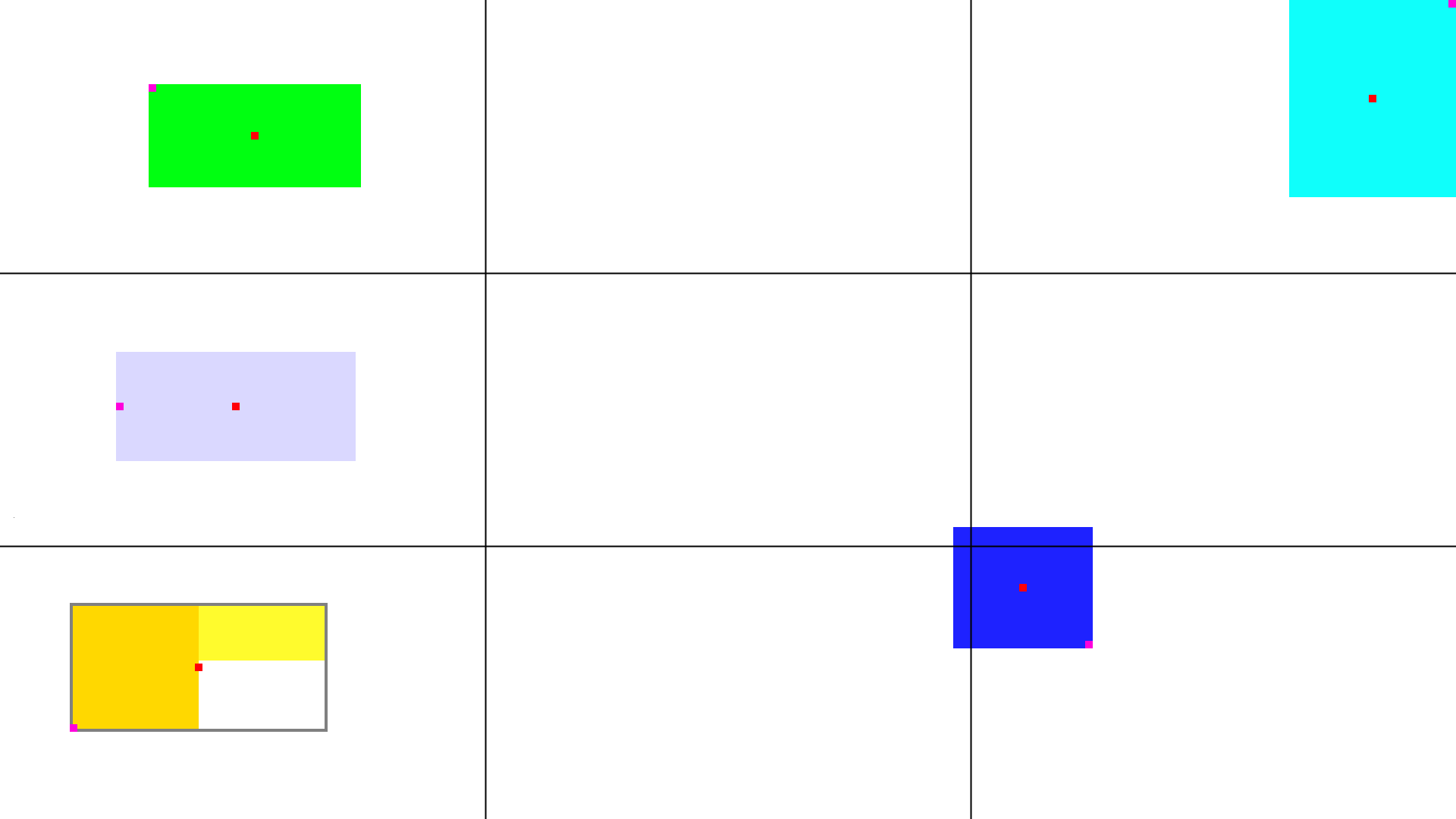
So now you briefly know what kind of boxes exist lets talk about positioning. As you know positioning in the old system was one of the main issues so we totally went for a different approach here. First of all the screen is now divided in 9 quadrants in a 3x3 format where the height/width is each times 1/3 of the respective screen size. Each box will store in which quadrant its center point is.
Along with what quadrant a box is in, the box will also store the respective point compared to the quadrant. This means a box in the top left will store the top left corner position, a box in the middle center quadrant will store the center position. The image below demonstrates how the center point (red) decides the quadrant and which point will be stored (purple). The position points are stored using a percentage relative to the top left corner of the quadrant it is in.
The final piece of information we store is the size of the box, which is simply stored in pixel size. This is one big difference from the old system where the mods became bigger/smaller if you resized the screen, they will now remain the same to avoid all the issues we had scaling wise in the past.
With all this information the box system can do its job and calculate the actual positions for the box when we want to render them. So what happens now if you change the screen size? Basically the system will keep it's stored positions the same relative position to it's quadrant, no matter the screen size. But since width/height doesn't scale it will be pushed away from the stored point. You can easily see this in the example video above with the grouped box on the right being pushed both up/down to keep the center right point in the exact middle of it's quadrant.
Another big important reason we designed the system as a standalone piece of software is that we have automated tests running every time we do code changes to assure no developer breaks the system by accident. One thing we definitely learned is that you can't test every single piece of code in our massive code base. So these kind of automated tests will be added more and more to help us test.
Finally this update is the first new feature also using a new mod profile versioning system we implemented in BLC 3.1. This versioning system will help us avoid breaking profiles if we add new features but not lose backwards compatibility. It also gives us the ability to write migration scripts which we used here to convert the old stored positions to the new system.
Conclusion
BLC 3.2 brings a complete newly designed mod positioning & scaling system. This system will behave a bit different from the old logic but should be a lot smoother & easier to use. The system is also more abstract and testable in order to avoid your profiles from glitching out randomly. We also did some extensive testing on this new system with our test team to make sure your current setups don't break. Of course we'll continue improving this system as well as add new features now the system has had a good cleanup.
Posted on 28 May 2021 - 08:10 AM
nicePosted on 28 May 2021 - 08:42 AM
EpicPosted on 28 May 2021 - 11:01 AM
Ooo very cool!Posted on 28 May 2021 - 12:01 PM
Automatically DeletedPosted on 28 May 2021 - 12:39 PM
This is really awesome, but i have an idea, can you write somewhere the size of the selected "component". I think it will be awesome !Posted on 28 May 2021 - 01:33 PM
tiakin69 wrote
What do you mean with write the size of the selected component? If you mean the size of the mods etc you can already enable "GUI Debug" in the badlion options and it will show you extra info like sizing & positioning for all the mods
Posted on 28 May 2021 - 03:22 PM
aPosted on 29 May 2021 - 05:10 AM
Amazing!Posted on 29 May 2021 - 09:47 AM
AMAZINGPosted on 29 May 2021 - 12:49 PM
awesomeLast edited on 31 May 2021 - 07:25 AM by a_u_r_a_e
Tried it and it works on M1 macs! Great to hear, I am coming back to BLC!!! (from fORgE)Posted on 31 May 2021 - 09:56 PM
my mods arent centered on the box so i have to add spaces to the display names, like in keystrokes. help please?Posted on 31 May 2021 - 10:37 PM
epic gamer momentLast edited on 31 May 2021 - 10:41 PM by toastwy
didnt mean to send this twice and i dont know how to delete replys :pLast edited on 02 June 2021 - 05:02 AM by GyllieGyllie
404poison wrote
Could you maybe make a bug report and include some screenshots? Then we can investigate the issue
Posted on 03 June 2021 - 01:19 PM
GyllieGyllie wrote
Hello everyone,
Welcome to the first Badlion Client Developer Blog! In these blog posts we'll be giving you all an insight how some of our Badlion Client features work and explain how we have come to these designs. In this first post we'll be discussing the new Mod positioning & scaling system we've implemented in the BLC 3.2 release. This system is used by mods we call Render Mods as they render something on the UI and includes mods like CPS, FPS, Player Counter, etc.
This new mod system will increase stability of your mod profiles, prevent them from bugging out, and create an overall game play experience for all of you. Most of you won't even notice any new changes, because the system just works and will keep your mods the way they were before the changes.
Previous System and its issues
The base of the old system was started in the very early days of the development process for the client. Over the past 3 years this system was adapted, expanded and built upon based on the needs of new mods we were adding at that point in time. Of course during this process we always had to make sure we didn't break how existing mods already work and how their information was already stored in the profile from our users. Here is a quick brief explanation how this information used to be stored in the old system.
First of all we divided the screen in 32 boxes horizontally & 32 boxes vertically. Using these boxes we stored the box it is in and a relative percentage compared to the top left of position of the box.
Using this for every render mod we stored 3 positions:
- Top Left Corner
- Middle Point
- Bottom Right Corner
Using these 3 positions we calculated the size of the mod & it's position. Along with this we also stored what mods were locked or snapped against it and on what side.
Now the main issues with this system is that the stored values were constantly being updated when you were resizing the screen, going in/out fullscreen, adapting a mod setting… Basically it was updating your profile way too many times what often resulted in profiles breaking completely, causing new mods to be hard to add or adding new functionality into existing mods on this "old" system.
Coming up with a solution
A couple weeks ago we decided it was time to think about a new solution and design. During this process we first listed everything the system requires to work for the current mods and also keep in mind flexibility for future plans. Multiple solutions came up during the discussions but at that point we also accounted for all the issues we've had in the past trying to add new features, issues our users have when using the old system and a system possible to be migrated to without resetting everyone's setup.
After discussing everything needed we came with a solution we call the Box System.
The new solution
The Box System is in short words an abstract piece of software that is designed to work completely on its own, even outside of Minecraft and our mod code. It's only purpose is to handle "boxes" that have a certain place & size on the screen and update them when the screen resizes. Here is a quick video of how it works in a prototype version before we dive more into how it works.
As mentioned above this system is build around boxes. Right now we only have 3 type of boxes:
- A normal simple box which is just completely on its own. Has its own position and size information stored
- A grouped box which also has its own position and size but also has a list of sub-boxes linked to it
- A sub box which is part of a grouped box and holds relative position & size compared to its grouped box
In the video above you can see examples of each type as well as 1 box (top middle) which showcases a box which changes size during the rendering process since some of our mods have to become wider/smaller based on what they are displaying. These boxes stored their default size and just adapt the position on the moment of rendering.
So now you briefly know what kind of boxes exist lets talk about positioning. As you know positioning in the old system was one of the main issues so we totally went for a different approach here. First of all the screen is now divided in 9 quadrants in a 3x3 format where the height/width is each times 1/3 of the respective screen size. Each box will store in which quadrant its center point is.
Along with what quadrant a box is in, the box will also store the respective point compared to the quadrant. This means a box in the top left will store the top left corner position, a box in the middle center quadrant will store the center position. The image below demonstrates how the center point (red) decides the quadrant and which point will be stored (purple). The position points are stored using a percentage relative to the top left corner of the quadrant it is in.
The final piece of information we store is the size of the box, which is simply stored in pixel size. This is one big difference from the old system where the mods became bigger/smaller if you resized the screen, they will now remain the same to avoid all the issues we had scaling wise in the past.
With all this information the box system can do its job and calculate the actual positions for the box when we want to render them. So what happens now if you change the screen size? Basically the system will keep it's stored positions the same relative position to it's quadrant, no matter the screen size. But since width/height doesn't scale it will be pushed away from the stored point. You can easily see this in the example video above with the grouped box on the right being pushed both up/down to keep the center right point in the exact middle of it's quadrant.
Another big important reason we designed the system as a standalone piece of software is that we have automated tests running every time we do code changes to assure no developer breaks the system by accident. One thing we definitely learned is that you can't test every single piece of code in our massive code base. So these kind of automated tests will be added more and more to help us test.
Finally this update is the first new feature also using a new mod profile versioning system we implemented in BLC 3.1. This versioning system will help us avoid breaking profiles if we add new features but not lose backwards compatibility. It also gives us the ability to write migration scripts which we used here to convert the old stored positions to the new system.
Conclusion
BLC 3.2 brings a complete newly designed mod positioning & scaling system. This system will behave a bit different from the old logic but should be a lot smoother & easier to use. The system is also more abstract and testable in order to avoid your profiles from glitching out randomly. We also did some extensive testing on this new system with our test team to make sure your current setups don't break. Of course we'll continue improving this system as well as add new features now the system has had a good cleanup.
Posted on 06 June 2021 - 02:25 PM
coolPosted on 08 June 2021 - 12:22 PM
im new to badlion and overall it seems like a great pvp client. Me and my friends have started using it and its literaly insane. Ive tried out a crap ton of clients and this is the best. I just wanna say a big thank you to the staff, mods and the whole Badlion community for making such an amazing client! hope every1 is doing good and adios.Posted on 08 June 2021 - 12:23 PM
btw i just wanan say i created a blc accout in febuary but i never bothered to use it so im new lmao